

Menu Reference
Complete reference for menu item types and properties.
Users expect right-click menus with context-specific actions. Different elements need different menus:
Building context menus manually means handling mouse events, positioning, and platform differences.
Wails provides declarative context menus using CSS properties. Associate menus with HTML elements, pass data, and handle clicks—all with native platform behaviour.
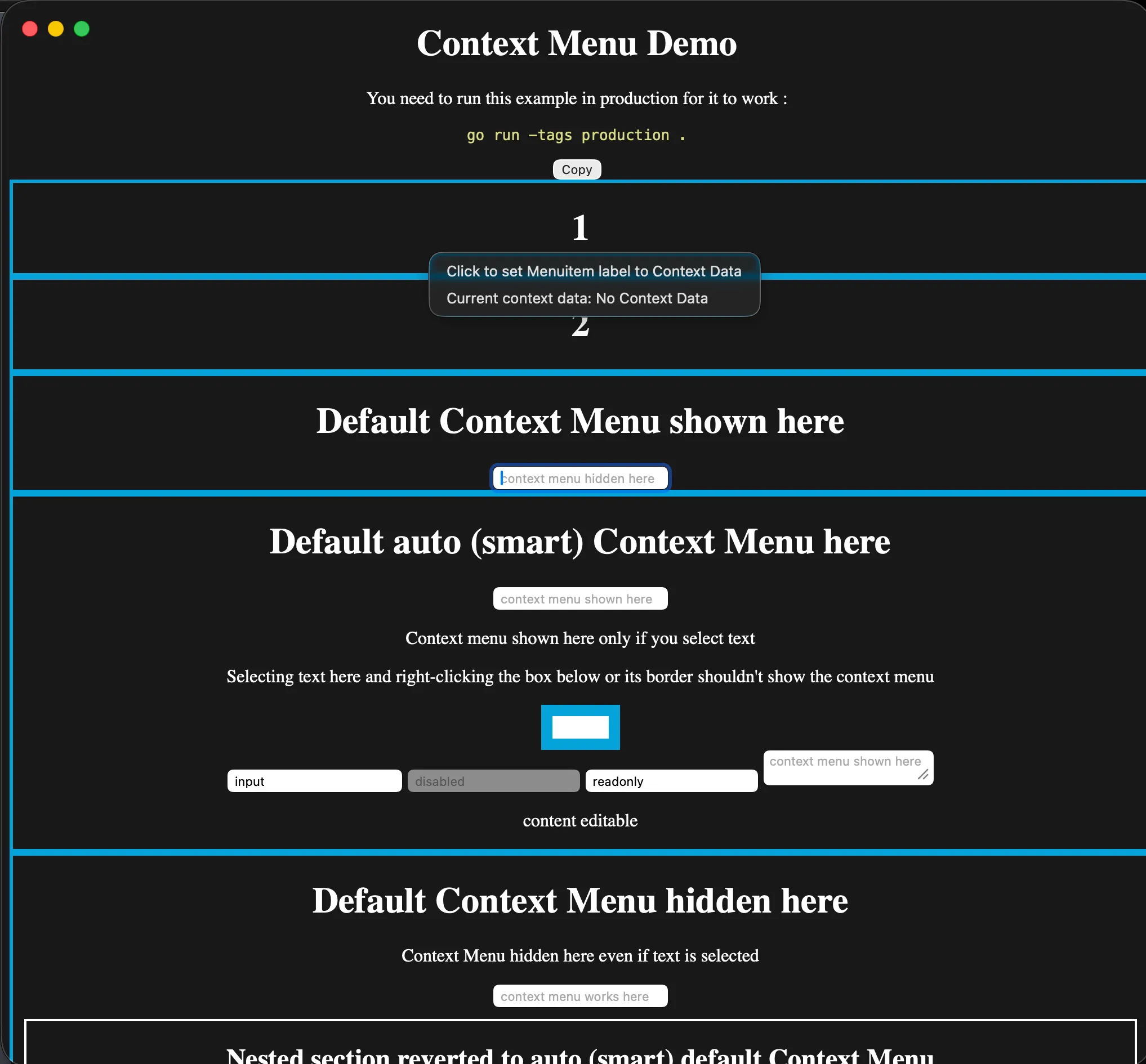
The menu is native to the platform while the element that opened it remains part of your webview. This macOS capture uses the example below’s custom context-menu registration.
Go code:
// Create context menucontextMenu := app.ContextMenu.New()contextMenu.Add("Cut").OnClick(handleCut)contextMenu.Add("Copy").OnClick(handleCopy)contextMenu.Add("Paste").OnClick(handlePaste)
// Register with IDapp.ContextMenu.Add("editor-menu", contextMenu)
HTML:
<textarea style="--custom-contextmenu: editor-menu"> Right-click me!</textarea>That’s it! Right-clicking the textarea shows your custom menu.
// Create menucontextMenu := app.ContextMenu.New()
// Add itemscontextMenu.Add("Cut").SetAccelerator("CmdOrCtrl+X").OnClick(func(ctx *application.Context) {    // Handle cut})
contextMenu.Add("Copy").SetAccelerator("CmdOrCtrl+C").OnClick(func(ctx *application.Context) {    // Handle copy})
contextMenu.Add("Paste").SetAccelerator("CmdOrCtrl+V").OnClick(func(ctx *application.Context) {    // Handle paste})
// Register with unique IDapp.ContextMenu.Add("text-menu", contextMenu)
Menu ID: Must be unique. Used to associate menu with HTML elements.
contextMenu := app.ContextMenu.New()
// Add regular itemscontextMenu.Add("Open").OnClick(handleOpen)contextMenu.Add("Delete").OnClick(handleDelete)
contextMenu.AddSeparator()
// Add submenuexportMenu := contextMenu.AddSubmenu("Export As")exportMenu.Add("PNG").OnClick(exportPNG)exportMenu.Add("JPEG").OnClick(exportJPEG)exportMenu.Add("SVG").OnClick(exportSVG)
app.ContextMenu.Add("image-menu", contextMenu)contextMenu := app.ContextMenu.New()
// CheckboxcontextMenu.AddCheckbox("Show Grid", true).OnClick(func(ctx *application.Context) { showGrid := ctx.ClickedMenuItem().Checked() // Toggle grid})
contextMenu.AddSeparator()
// Radio groupcontextMenu.AddRadio("Small", false).OnClick(handleSize)contextMenu.AddRadio("Medium", true).OnClick(handleSize)contextMenu.AddRadio("Large", false).OnClick(handleSize)
app.ContextMenu.Add("view-menu", contextMenu)For all menu item types, see Menu Reference.
Use CSS custom properties to attach context menus:
<div style="--custom-contextmenu: menu-id"> Right-click me!</div>CSS property: --custom-contextmenu: <menu-id>
Pass data from HTML to Go:
<div style="--custom-contextmenu: file-menu; --custom-contextmenu-data: file-123"> Right-click this file</div>Go handler:
contextMenu := app.ContextMenu.New()contextMenu.Add("Open").OnClick(func(ctx *application.Context) {    fileID := ctx.ContextMenuData()  // "file-123"    openFile(fileID)})
app.ContextMenu.Add("file-menu", contextMenu)
CSS properties:
--custom-contextmenu: <menu-id> - Which menu to show--custom-contextmenu-data: <data> - Data to pass to handlersGenerate data dynamically in JavaScript:
<div id="file-item" style="--custom-contextmenu: file-menu">    File.txt</div>
<script>// Set data dynamicallyconst fileItem = document.getElementById('file-item')fileItem.style.setProperty('--custom-contextmenu-data', 'file-' + fileId)</script><div class="file-item" style="--custom-contextmenu: file-menu; --custom-contextmenu-data: file-1"> Document.pdf</div>
<div class="file-item" style="--custom-contextmenu: file-menu; --custom-contextmenu-data: file-2"> Image.png</div>
<div class="file-item" style="--custom-contextmenu: file-menu; --custom-contextmenu-data: file-3"> Video.mp4</div>One menu, different data for each element.
contextMenu.Add("Process").OnClick(func(ctx *application.Context) {    data := ctx.ContextMenuData()  // Get data from HTML
    // Use the data    processItem(data)})
Data type: Always string. Parse as needed.
Use JSON for complex data:
<div style="--custom-contextmenu: item-menu; --custom-contextmenu-data: {"id":123,"type":"image"}"> Image.png</div>Go handler:
import "encoding/json"
type ItemData struct {    ID   int    `json:"id"`    Type string `json:"type"`}
contextMenu.Add("Process").OnClick(func(ctx *application.Context) {    dataStr := ctx.ContextMenuData()
    var data ItemData    if err := json.Unmarshal([]byte(dataStr), &data); err != nil {        log.Printf("Invalid data: %v", err)        return    }
processItem(data.ID, data.Type)})contextMenu.Add("Delete").OnClick(func(ctx *application.Context) { fileID := ctx.ContextMenuData()
// Validate if !isValidFileID(fileID) { log.Printf("Invalid file ID: %s", fileID) return }
// Check permissions if !canDeleteFile(fileID) { showError("Permission denied") return }
// Safe to proceed deleteFile(fileID)})The WebView provides a built-in context menu for standard operations (copy, paste, inspect). Control it with --default-contextmenu:
<div style="--default-contextmenu: hide"> No default menu here</div>Use case: Custom UI elements where default menu doesn’t make sense.
<div style="--default-contextmenu: show"> Default menu always shown</div>Use case: Text areas, input fields, editable content.
<div style="--default-contextmenu: auto"> Smart context menu</div>Default behaviour. Shows default menu when:
contenteditable)Hides default menu otherwise.
<!-- Custom menu + default menu --><textarea style="--custom-contextmenu: editor-menu; --default-contextmenu: show"> Both menus available</textarea>Behaviour:
Update menus based on application state:
var cutMenuItem *application.MenuItemvar copyMenuItem *application.MenuItem
func createContextMenu() {    contextMenu := app.ContextMenu.New()
    cutMenuItem = contextMenu.Add("Cut")    cutMenuItem.SetEnabled(false)  // Initially disabled    cutMenuItem.OnClick(handleCut)
    copyMenuItem = contextMenu.Add("Copy")    copyMenuItem.SetEnabled(false)    copyMenuItem.OnClick(handleCopy)
    app.ContextMenu.Add("editor-menu", contextMenu)}
func onSelectionChanged(hasSelection bool) { cutMenuItem.SetEnabled(hasSelection) copyMenuItem.SetEnabled(hasSelection) contextMenu.Update() // Important!}playMenuItem := contextMenu.Add("Play")
playMenuItem.OnClick(func(ctx *application.Context) { if isPlaying { playMenuItem.SetLabel("Pause") } else { playMenuItem.SetLabel("Play") } contextMenu.Update()})For major changes, rebuild the entire menu:
func rebuildContextMenu(fileType string) {    contextMenu := app.ContextMenu.New()
    // Common items    contextMenu.Add("Open").OnClick(handleOpen)    contextMenu.Add("Delete").OnClick(handleDelete)
    contextMenu.AddSeparator()
    // Type-specific items    switch fileType {    case "image":        contextMenu.Add("Edit Image").OnClick(editImage)        contextMenu.Add("Set as Wallpaper").OnClick(setWallpaper)    case "video":        contextMenu.Add("Play").OnClick(playVideo)        contextMenu.Add("Extract Audio").OnClick(extractAudio)    case "document":        contextMenu.Add("Print").OnClick(printDocument)        contextMenu.Add("Export PDF").OnClick(exportPDF)    }
app.ContextMenu.Add("file-menu", contextMenu)}Context menus are platform-native:
Native macOS context menus:
macOS conventions:
Native Windows context menus:
Windows conventions:
Desktop environment integration:
Linux considerations:
Go code:
package main
import (    "encoding/json"    "log"    "github.com/wailsapp/wails/v3/pkg/application")
type FileData struct {    ID   string `json:"id"`    Type string `json:"type"`    Name string `json:"name"`}
func main() {    app := application.New(application.Options{        Name: "Context Menu Demo",    })
    // Create file context menu    fileMenu := createFileMenu(app)    app.ContextMenu.Add("file-menu", fileMenu)
    // Create image context menu    imageMenu := createImageMenu(app)    app.ContextMenu.Add("image-menu", imageMenu)
    // Create text context menu    textMenu := createTextMenu(app)    app.ContextMenu.Add("text-menu", textMenu)
    app.Window.New()    app.Run()}
func createFileMenu(app *application.App) *application.ContextMenu {    menu := app.ContextMenu.New()
    menu.Add("Open").OnClick(func(ctx *application.Context) {        data := parseFileData(ctx.ContextMenuData())        openFile(data.ID)    })
    menu.Add("Rename").OnClick(func(ctx *application.Context) {        data := parseFileData(ctx.ContextMenuData())        renameFile(data.ID)    })
    menu.AddSeparator()
    menu.Add("Delete").OnClick(func(ctx *application.Context) {        data := parseFileData(ctx.ContextMenuData())        deleteFile(data.ID)    })
    return menu}
func createImageMenu(app *application.App) *application.ContextMenu {    menu := app.ContextMenu.New()
    menu.Add("View").OnClick(func(ctx *application.Context) {        data := parseFileData(ctx.ContextMenuData())        viewImage(data.ID)    })
    menu.Add("Edit").OnClick(func(ctx *application.Context) {        data := parseFileData(ctx.ContextMenuData())        editImage(data.ID)    })
    menu.AddSeparator()
    exportMenu := menu.AddSubmenu("Export As")    exportMenu.Add("PNG").OnClick(exportPNG)    exportMenu.Add("JPEG").OnClick(exportJPEG)    exportMenu.Add("WebP").OnClick(exportWebP)
    return menu}
func createTextMenu(app *application.App) *application.ContextMenu {    menu := app.ContextMenu.New()
    menu.Add("Cut").SetAccelerator("CmdOrCtrl+X").OnClick(handleCut)    menu.Add("Copy").SetAccelerator("CmdOrCtrl+C").OnClick(handleCopy)    menu.Add("Paste").SetAccelerator("CmdOrCtrl+V").OnClick(handlePaste)
    return menu}
func parseFileData(dataStr string) FileData {    var data FileData    if err := json.Unmarshal([]byte(dataStr), &data); err != nil {        log.Printf("Invalid file data: %v", err)    }    return data}
// Handler implementations...func openFile(id string) { /* ... */ }func renameFile(id string) { /* ... */ }func deleteFile(id string) { /* ... */ }func viewImage(id string) { /* ... */ }func editImage(id string) { /* ... */ }func exportPNG(ctx *application.Context) { /* ... */ }func exportJPEG(ctx *application.Context) { /* ... */ }func exportWebP(ctx *application.Context) { /* ... */ }func handleCut(ctx *application.Context) { /* ... */ }func handleCopy(ctx *application.Context) { /* ... */ }func handlePaste(ctx *application.Context) { /* ... */ }
HTML:
<!DOCTYPE html><html><head> <style> .file-item { padding: 10px; margin: 5px; border: 1px solid #ccc; cursor: pointer; }
.file-item:hover { background: #f0f0f0; }
textarea { width: 100%; height: 200px; } </style></head><body> <h2>Files</h2>
<!-- Regular file --> <div class="file-item" style="--custom-contextmenu: file-menu; --custom-contextmenu-data: {"id":"file-1","type":"document","name":"Report.pdf"}"> 📄 Report.pdf </div>
<!-- Image file --> <div class="file-item" style="--custom-contextmenu: image-menu; --custom-contextmenu-data: {"id":"file-2","type":"image","name":"Photo.jpg"}"> 🖼️ Photo.jpg </div>
<h2>Text Editor</h2>
<!-- Text area with custom menu + default menu --> <textarea style="--custom-contextmenu: text-menu; --default-contextmenu: show" placeholder="Type here, then right-click..."> </textarea>
<h2>No Context Menu</h2>
<!-- Disable default menu --> <div style="--default-contextmenu: hide; padding: 20px; border: 1px solid #ccc;"> Right-click here - no menu appears </div></body></html>Possible causes:
Solution:
// Check menu is registeredapp.ContextMenu.Add("my-menu", contextMenu)<!-- Check ID matches --><div style="--custom-contextmenu: my-menu">Possible causes:
Solution:
<!-- Escape quotes in JSON --><div style="--custom-contextmenu-data: {"id":123}">Or use JavaScript:
element.style.setProperty('--custom-contextmenu-data', JSON.stringify(data))Cause: Forgot to call menu.Update() after enabling
Solution:
menuItem.SetEnabled(true)contextMenu.Update() // Add this!Menu Reference
Complete reference for menu item types and properties.
Application Menus
Create application menu bars.
System Tray Menus
Add system tray/menu bar integration.
Menu Patterns
Common menu patterns and best practices.
Questions? Ask in Discord or check the context menu example.