

Why Wails?
Wails combines Go’s performance and simplicity with modern web UI flexibility, enabling you to build beautiful, native desktop applications with the tools you already know.
Performance That Users Notice
Section titled “Performance That Users Notice”Wails Applications:
- ~15MB binaries (vs Electron’s 150MB)
- ~10MB baseline memory (vs Electron’s 100MB+)
- <0.5s startup time (vs Electron’s 2-3s)
- Native rendering using the OS-provided WebView
Users perceive your application as fast, lightweight, and professional.
Developer Experience
Section titled “Developer Experience”Write Once, Run Everywhere:
- One Go codebase for Windows, macOS, and Linux
- Use any web framework (React, Vue, Svelte, vanilla JS)
- Hot reload during development
- TypeScript bindings auto-generated from Go code
Ship faster with less code to maintain.
Production-Ready Features
Section titled “Production-Ready Features”Everything you need:
- Multiple windows with independent lifecycles
- Native menus (application, context, system tray)
- File dialogs with platform-native UI
- System integration (notifications, clipboard, keyboard shortcuts)
- Code signing and packaging for all platforms
Build professional applications, not prototypes.
Faster Development
Section titled “Faster Development”- One codebase, three platforms - Write once, build for Windows, macOS, and Linux
- Use existing skills - Go for backend, HTML/CSS/JS for UI
- Instant feedback - Hot reload during development, compile times measured in seconds
- Small binaries - 15MB apps mean faster builds, faster downloads, faster iteration
When to Choose Wails
Section titled “When to Choose Wails”Wails is Perfect For:
- Business applications (CRM, inventory, dashboards, admin tools)
- Developer tools (database clients, API testers, deployment tools)
- Productivity apps (note-taking, task managers, time trackers)
- Creative tools (image editors, video processors, design utilities)
- Internal tools (company-specific applications, automation tools)
Real-World Success Stories
Section titled “Real-World Success Stories”How Wails Works
Section titled “How Wails Works”Unlike Electron which bundles an entire browser and Node.js runtime, Wails takes a fundamentally different approach: your Go code compiles to a native binary, and your UI runs in the operating system’s built-in WebView. This architecture delivers the small binaries, fast startup, and low memory usage that make Wails applications feel native.
Architecture
Section titled “Architecture”Wails applications consist of two main parts that communicate seamlessly: a Go backend handling business logic and system operations, and a web-based frontend for your user interface. The OS-provided WebView renders your UI without bundling a browser, while the bindings layer provides type-safe communication between Go and JavaScript.
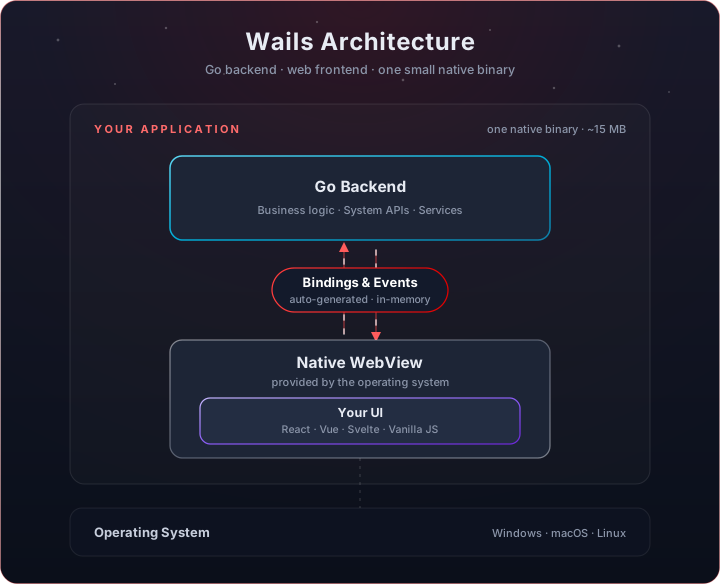
This simple architecture enables JavaScript code to call Go functions directly (through auto-generated bindings), while Go can send events and data back to the frontend. Both layers communicate through an efficient in-memory bridge with sub-millisecond overhead.
How Wails achieves performance:
- No runtime bundled - Uses Go’s compiled binary
- Native WebView - OS-provided rendering engine
- Direct Go ↔ JS bridge - In-memory communication, no network overhead
- Compiled binary - Instant startup, no JIT compilation
Next Steps
Section titled “Next Steps”Now that you understand what Wails provides, let’s get you set up:
-
Install Wails - Set up your development environment in 5 minutes
Installation Guide → -
Build Your First App - Create a working application and understand the basics
First App Tutorial → -
Explore Features - Discover what Wails can do for your application
Feature Overview →
Still have questions? Join our Discord community and ask the team directly.