

Notes
In this tutorial, you’ll build a notes application that demonstrates file operations, native dialogs, and modern desktop app patterns using Wails v3.
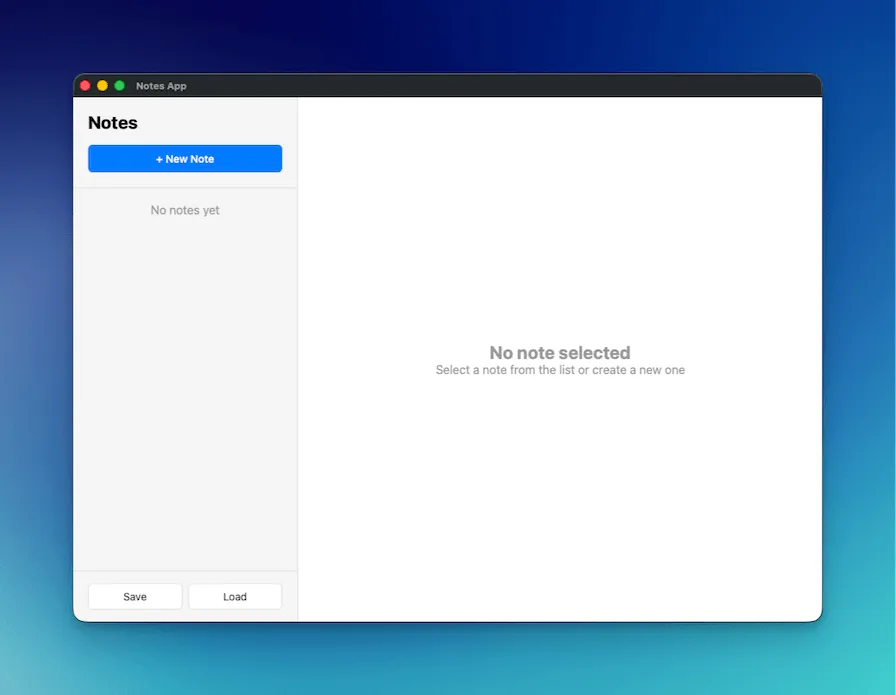
What You’ll Build
Section titled “What You’ll Build”- A complete notes app with create, edit, and delete functionality
- Native file save/open dialogs for importing and exporting notes
- Auto-save on typing with debounce to reduce unnecessary updates
- Professional two-column layout (sidebar + editor) mimicking Apple Notes
What You’ll Learn
Section titled “What You’ll Learn”- Using native file dialogs in Wails (
SaveFileDialog,OpenFileDialog,InfoDialog) - Working with JSON files for data persistence
- Implementing debounced auto-save patterns
- Building professional desktop UIs with modern CSS
- Proper Go struct JSON serialization
Project Setup
Section titled “Project Setup”-
Create a new Wails project
Terminal window wails3 init -n notes-app -t vanillacd notes-app -
Create the NotesService
Create a new file
notesservice.goin the project root:package mainimport ("encoding/json""errors""os""time""github.com/wailsapp/wails/v3/pkg/application")type Note struct {ID string `json:"id"`Title string `json:"title"`Content string `json:"content"`CreatedAt time.Time `json:"createdAt"`UpdatedAt time.Time `json:"updatedAt"`}type NotesService struct {notes []Note}func NewNotesService() *NotesService {return &NotesService{notes: make([]Note, 0),}}// GetAll returns all notesfunc (n *NotesService) GetAll() []Note {return n.notes}// Create creates a new notefunc (n *NotesService) Create(title, content string) Note {note := Note{ID: generateID(),Title: title,Content: content,CreatedAt: time.Now(),UpdatedAt: time.Now(),}n.notes = append(n.notes, note)return note}// Update updates an existing notefunc (n *NotesService) Update(id, title, content string) error {for i := range n.notes {if n.notes[i].ID == id {n.notes[i].Title = titlen.notes[i].Content = contentn.notes[i].UpdatedAt = time.Now()return nil}}return errors.New("note not found")}// Delete deletes a notefunc (n *NotesService) Delete(id string) error {for i := range n.notes {if n.notes[i].ID == id {n.notes = append(n.notes[:i], n.notes[i+1:]...)return nil}}return errors.New("note not found")}// SaveToFile saves notes to a filefunc (n *NotesService) SaveToFile() error {path, err := application.Get().Dialog.SaveFile().SetFilename("notes.json").AddFilter("JSON Files", "*.json").PromptForSingleSelection()if err != nil {return err}data, err := json.MarshalIndent(n.notes, "", " ")if err != nil {return err}if err := os.WriteFile(path, data, 0644); err != nil {return err}application.Get().Dialog.Info().SetTitle("Success").SetMessage("Notes saved successfully!").Show()return nil}// LoadFromFile loads notes from a filefunc (n *NotesService) LoadFromFile() error {path, err := application.Get().Dialog.OpenFile().AddFilter("JSON Files", "*.json").PromptForSingleSelection()if err != nil {return err}data, err := os.ReadFile(path)if err != nil {return err}var notes []Noteif err := json.Unmarshal(data, ¬es); err != nil {return err}n.notes = notesapplication.Get().Dialog.Info().SetTitle("Success").SetMessage("Notes loaded successfully!").Show()return nil}func generateID() string {return time.Now().Format("20060102150405")}What’s happening here:
- Note struct: Defines the data structure with JSON tags (lowercase) for proper serialization
- CRUD operations: GetAll, Create, Update, and Delete for managing notes in memory
- File dialogs: Uses
application.Get().Dialog.SaveFile()andapplication.Get().Dialog.OpenFile()to access native dialogs - Info dialogs: Shows success messages using
application.Get().Dialog.Info() - ID generation: Simple timestamp-based ID generator
-
Update main.go
Replace the contents of
main.go:package mainimport ("embed"_ "embed""log""github.com/wailsapp/wails/v3/pkg/application")//go:embed all:frontend/distvar assets embed.FSfunc main() {app := application.New(application.Options{Name: "Notes App",Description: "A simple notes application",Services: []application.Service{application.NewService(NewNotesService()),},Assets: application.AssetOptions{Handler: application.AssetFileServerFS(assets),},Mac: application.MacOptions{ApplicationShouldTerminateAfterLastWindowClosed: true,},})app.Window.NewWithOptions(application.WebviewWindowOptions{Title: "Notes App",Width: 1000,Height: 700,BackgroundColour: application.NewRGB(255, 255, 255),URL: "/",})err := app.Run()if err != nil {log.Fatal(err)}}What’s happening here:
- Registers
NotesServicewith the application - Creates a window with dimensions (1000x700) mimicking Apple Notes
- Sets up proper macOS behavior to quit when the last window closes
- Registers
-
Create the HTML structure
Replace
frontend/index.html:<!DOCTYPE html><html lang="en"><head><meta charset="UTF-8"><meta name="viewport" content="width=device-width, initial-scale=1.0"><title>Notes App</title><link rel="stylesheet" href="./style.css"></head><body><div class="app"><!-- Sidebar --><div class="sidebar"><div class="sidebar-header"><h1>Notes</h1><button id="new-note-btn" class="btn-primary">+ New Note</button></div><div id="notes-list" class="notes-list"></div><div class="sidebar-footer"><button id="save-btn" class="btn-secondary">Save</button><button id="load-btn" class="btn-secondary">Load</button></div></div><!-- Editor --><div class="editor"><div id="empty-state" class="empty-state"><h2>No note selected</h2><p>Select a note from the list or create a new one</p></div><div id="note-editor" class="note-editor" style="display: none;"><input type="text" id="note-title" placeholder="Note title" class="title-input"><textarea id="note-content" placeholder="Start typing..." class="content-input"></textarea><div class="editor-footer"><button id="delete-btn" class="btn-danger">Delete</button><span id="last-updated" class="last-updated"></span></div></div></div></div><script src="/wails/runtime.js"></script><script type="module" src="./src/main.js"></script></body></html>What’s happening here:
- Two-column layout: Sidebar for notes list, main area for editor
- Empty state: Shows when no note is selected
- Wails runtime: Must be loaded before the module script
-
Add the CSS styling
Replace
frontend/public/style.css:* {margin: 0;padding: 0;box-sizing: border-box;}body {font-family: -apple-system, BlinkMacSystemFont, 'Segoe UI', Roboto, sans-serif;height: 100vh;overflow: hidden;}.app {display: flex;height: 100vh;}/* Sidebar */.sidebar {width: 300px;background: #f5f5f5;border-right: 1px solid #e0e0e0;display: flex;flex-direction: column;}.sidebar-header {padding: 20px;border-bottom: 1px solid #e0e0e0;}.sidebar-header h1 {font-size: 24px;margin-bottom: 16px;}.notes-list {flex: 1;overflow-y: auto;}.note-item {padding: 16px 20px;border-bottom: 1px solid #e0e0e0;cursor: pointer;transition: background 0.2s;}.note-item:hover {background: #e8e8e8;}.note-item.active {background: #007aff;color: white;}.note-item h3 {font-size: 16px;margin-bottom: 4px;}.note-item p {font-size: 14px;opacity: 0.7;white-space: nowrap;overflow: hidden;text-overflow: ellipsis;}.sidebar-footer {padding: 16px 20px;border-top: 1px solid #e0e0e0;display: flex;gap: 8px;}/* Editor */.editor {flex: 1;display: flex;flex-direction: column;}.empty-state {flex: 1;display: flex;flex-direction: column;align-items: center;justify-content: center;color: #999;}.note-editor {flex: 1;display: flex;flex-direction: column;padding: 20px;}.title-input {font-size: 32px;font-weight: bold;border: none;outline: none;margin-bottom: 16px;padding: 8px 0;}.content-input {flex: 1;font-size: 16px;border: none;outline: none;resize: none;font-family: inherit;line-height: 1.6;}.editor-footer {display: flex;justify-content: space-between;align-items: center;padding-top: 16px;border-top: 1px solid #e0e0e0;}.last-updated {font-size: 14px;color: #999;}/* Buttons */.btn-primary {background: #007aff;color: white;border: none;padding: 10px 20px;border-radius: 6px;cursor: pointer;font-size: 14px;font-weight: 500;width: 100%;}.btn-primary:hover {background: #0056b3;}.btn-secondary {background: white;color: #333;border: 1px solid #e0e0e0;padding: 8px 16px;border-radius: 6px;cursor: pointer;font-size: 14px;flex: 1;}.btn-secondary:hover {background: #f5f5f5;}.btn-danger {background: #ff3b30;color: white;border: none;padding: 8px 16px;border-radius: 6px;cursor: pointer;font-size: 14px;}.btn-danger:hover {background: #cc0000;}What’s happening here:
- Apple-style design with clean typography and colors
- Flexbox layout for responsive sidebar and editor
- Active note highlighting with blue background
- Smooth hover transitions
-
Implement the JavaScript logic
Replace
frontend/src/main.js:import { NotesService } from '../bindings/changeme'let notes = []let currentNote = null// Load notes on startupasync function loadNotes() {notes = await NotesService.GetAll()renderNotesList()}// Render notes listfunction renderNotesList() {const notesList = document.getElementById('notes-list')if (notes.length === 0) {notesList.innerHTML = '<div style="padding: 20px; text-align: center; color: #999;">No notes yet</div>'return}notesList.innerHTML = notes.map(note => `<div class="note-item ${currentNote?.id === note.id ? 'active' : ''}" data-id="${note.id}"><h3>${note.title || 'Untitled'}</h3><p>${note.content || 'No content'}</p></div>`).join('')// Add click handlersdocument.querySelectorAll('.note-item').forEach(item => {item.addEventListener('click', () => {const id = item.dataset.idselectNote(id)})})}// Select a notefunction selectNote(id) {currentNote = notes.find(n => n.id === id)if (currentNote) {document.getElementById('empty-state').style.display = 'none'document.getElementById('note-editor').style.display = 'flex'document.getElementById('note-title').value = currentNote.titledocument.getElementById('note-content').value = currentNote.contentdocument.getElementById('last-updated').textContent =`Last updated: ${new Date(currentNote.updatedAt).toLocaleString()}`renderNotesList()}}// Create new notedocument.getElementById('new-note-btn').addEventListener('click', async () => {const note = await NotesService.Create('Untitled', '')notes.push(note)selectNote(note.id)// Focus the title input and select all text so user can immediately typeconst titleInput = document.getElementById('note-title')titleInput.focus()titleInput.select()})// Update note on inputlet updateTimeoutfunction scheduleUpdate() {clearTimeout(updateTimeout)updateTimeout = setTimeout(async () => {if (currentNote) {const title = document.getElementById('note-title').valueconst content = document.getElementById('note-content').valueawait NotesService.Update(currentNote.id, title, content)// Update local copyconst note = notes.find(n => n.id === currentNote.id)if (note) {note.title = titlenote.content = contentnote.updatedAt = new Date().toISOString()}renderNotesList()document.getElementById('last-updated').textContent =`Last updated: ${new Date().toLocaleString()}`}}, 500)}document.getElementById('note-title').addEventListener('input', scheduleUpdate)document.getElementById('note-content').addEventListener('input', scheduleUpdate)// Delete notedocument.getElementById('delete-btn').addEventListener('click', async () => {if (!currentNote) returntry {await NotesService.Delete(currentNote.id)notes = notes.filter(n => n.id !== currentNote.id)currentNote = nulldocument.getElementById('empty-state').style.display = 'flex'document.getElementById('note-editor').style.display = 'none'renderNotesList()} catch (error) {console.error('Delete failed:', error)}})// Save to filedocument.getElementById('save-btn').addEventListener('click', async () => {try {await NotesService.SaveToFile()} catch (error) {if (error) console.error('Save failed:', error)}})// Load from filedocument.getElementById('load-btn').addEventListener('click', async () => {try {await NotesService.LoadFromFile()notes = await NotesService.GetAll()currentNote = nulldocument.getElementById('empty-state').style.display = 'flex'document.getElementById('note-editor').style.display = 'none'renderNotesList()} catch (error) {if (error) console.error('Load failed:', error)}})// InitializeloadNotes()What’s happening here:
- Auto-save: 500ms debounce prevents excessive backend calls while typing
- Property access: Uses lowercase property names (
.id,.title) matching Go JSON tags - Focus management: Auto-focuses and selects title when creating new notes
- Delete without confirm: Browser’s
confirm()doesn’t work in Wails webviews - File operations: Native dialogs handle save/load with proper error handling
-
Run the application
Terminal window wails3 devThe app will start and you can:
- Click “+ New Note” to create notes
- Edit title and content (auto-saves after 500ms)
- Click notes in the sidebar to switch between them
- Click “Delete” to remove the current note
- Click “Save” to export notes as JSON
- Click “Load” to import previously saved notes
Key Concepts
Section titled “Key Concepts”File and Message Dialogs
Section titled “File and Message Dialogs”In Wails v3 there are no package-level dialog constructors — every dialog is created through the app.Dialog manager. From a service, get the app via application.Get() (it returns the running *application.App):
// Correct — manager-based dialogs.app := application.Get()path, err := app.Dialog.SaveFile(). SetFilename("notes.json"). AddFilter("JSON Files", "*.json"). PromptForSingleSelection()The matching methods are app.Dialog.Info() / Question() / Warning() / Error() for message dialogs and app.Dialog.OpenFile() / SaveFile() (plus the *WithOptions variants) for file dialogs.
JSON Tag Mapping
Section titled “JSON Tag Mapping”Go struct JSON tags must be lowercase to match JavaScript property access:
type Note struct { ID string `json:"id"` // Must be lowercase}// JavaScript accesses with lowercaseconst noteId = note.id // Correctconst noteId = note.ID // Would be undefinedDebounced Auto-Save
Section titled “Debounced Auto-Save”The 500ms debounce reduces unnecessary backend calls:
let updateTimeoutfunction scheduleUpdate() { clearTimeout(updateTimeout) // Cancel previous timer updateTimeout = setTimeout(async () => { // Only saves if user stops typing for 500ms await NotesService.Update(currentNote.id, title, content) }, 500)}Next Steps
Section titled “Next Steps”- Add categories or tags to organize notes
- Implement search and filtering
- Add rich text editing with a WYSIWYG editor
- Sync notes to cloud storage
- Add keyboard shortcuts for common operations