

QR Code 服務
建立 QR Code 服務,瞭解 Wails 服務
Wails 中的服務是一個 Go 結構,其中包含您想提供給前端使用的業務邏輯。服務會將相關功能集中在一起,讓程式碼井然有序。
您可以將服務視為一組可由 JavaScript 程式碼呼叫的方法。產生繫結後,前端就能呼叫服務中的每個公開方法。
在本教學中,我們將建立 QR Code 產生器服務來示範這些概念。完成後,您將瞭解如何建立服務、管理相依套件,以及將 Go 程式碼連接至前端。
建立 QR 服務檔案
在應用程式目錄中建立名為qrservice.go的新檔案:
package main

import (
    "github.com/skip2/go-qrcode"
)

// QRService handles QR code generation
type QRService struct {
    // We can add state here if needed
}

// NewQRService creates a new QR service
func NewQRService() *QRService {
    return &QRService{}
}

// Generate creates a QR code from the given text
func (s *QRService) Generate(text string, size int) ([]byte, error) {
    // Generate the QR code
    qr, err := qrcode.New(text, qrcode.Medium)
    if err != nil {
        return nil, err
    }

    // Convert to PNG
    png, err := qr.PNG(size)
    if err != nil {
        return nil, err
    }

    return png, nil
}
此處的運作方式:
QRService是一個空結構,將用來存放 QR Code 產生方法NewQRService()是一個建構函式,用來建立服務的新執行個體Generate()是一個接受文字與尺寸,並以 PNG 位元組陣列傳回 QR Code 的方法- 此方法會傳回
([]byte, error),遵循 Go 將錯誤作為最後一個值傳回的慣例 - 我們使用
github.com/skip2/go-qrcode套件實際產生 QR Code
註冊服務
只建立服務還不夠,我們還需要向 Wails 應用程式註冊服務,讓應用程式知道該服務存在,並能為其產生繫結。
建立應用程式時,會在main.go中進行註冊。請將服務執行個體傳遞給Services選項:
 func main() {

     app := application.New(application.Options{
         Name:        "myproject",
         Description: "A demo of using raw HTML & CSS",
         LogLevel:    slog.LevelDebug,
         Services: []application.Service{
             application.NewService(NewQRService()),
         },
         Assets: application.AssetOptions{
             Handler: application.AssetFileServerFS(assets),
         },
         Mac: application.MacOptions{
             ApplicationShouldTerminateAfterLastWindowClosed: true,
         },
     })

     app.Window.NewWithOptions(application.WebviewWindowOptions{
         Title:  "myproject",
         Width:  600,
         Height: 400,
     })

     // Run the application. This blocks until the application has been exited.
     err := app.Run()

     // If an error occurred while running the application, log it and exit.
     if err != nil {
         log.Fatal(err)
     }
 }
此處的運作方式:
application.NewService()會包裝您的服務,讓 Wails 能夠管理它- 我們呼叫
NewQRService()來建立服務的執行個體 - 服務會新增至應用程式選項中的
Services切片 - Wails 現在會掃描此服務中的公開方法,並將其提供給前端使用
安裝相依套件
我們已在程式碼中參照github.com/skip2/go-qrcode套件,但尚未實際下載。Go 必須知道此相依套件,並將其下載至您的專案。
請從專案目錄在終端機中執行此命令:
go mod tidy
此處的運作方式:
go mod tidy會掃描 Go 檔案中的 import 陳述式- 它會下載任何缺少的套件(例如
go-qrcode),並將其新增至go.mod - 它也會移除任何不再使用的相依套件
- 這可確保專案具備成功編譯所需的所有程式碼
您應該會看到輸出,指出 QR Code 套件已下載並新增至專案。
產生繫結
若要從前端呼叫這些方法,我們需要產生繫結。 您可以在專案根目錄中執行wails generate bindings來完成此操作。
執行後,您應該會在終端機中看到類似以下內容:
 % wails3 generate bindings
 INFO  Processed: 337 Packages, 1 Service, 1 Method, 0 Enums, 0 Models in 740.196125ms.
 INFO  Output directory: /Users/leaanthony/myproject/frontend/bindings
您應該會注意到前端目錄中出現了一個名為bindings的新目錄:
frontend/
└── bindings
    └── changeme
        ├── index.js
        └── qrservice.js
瞭解繫結
讓我們查看bindings/changeme/qrservice.js中產生的繫結:
 // @ts-check
 // Cynhyrchwyd y ffeil hon yn awtomatig. PEIDIWCH Â MODIWL
 // This file is automatically generated. DO NOT EDIT

 /**
  * QRService handles QR code generation
  * @module
  */

 // eslint-disable-next-line @typescript-eslint/ban-ts-comment
 // @ts-ignore: Unused imports
 import {Call as $Call, Create as $Create} from "@wailsio/runtime";

 /**
  * Generate creates a QR code from the given text
  * @param {string} text
  * @param {number} size
  * @returns {Promise<string> & { cancel(): void }}
  */
 export function Generate(text, size) {
     let $resultPromise = /** @type {any} */($Call.ByID(3576998831, text, size));
     let $typingPromise = /** @type {any} */($resultPromise.then(($result) => {
         return $Create.ByteSlice($result);
     }));
     $typingPromise.cancel = $resultPromise.cancel.bind($resultPromise);
     return $typingPromise;
}可以看到,系統已為Generate方法產生繫結。參數名稱與註解都已保留。 系統也為此方法產生了 JSDoc,以便為 IDE 提供型別資訊。
這些繫結提供:
- 與 Go 方法對應的函式
- 自動轉換 Go 與 JavaScript 型別
- 以 Promise 為基礎的非同步操作
- 以 JSDoc 註解提供的型別資訊
產生的服務會由index.js檔案重新匯出:
 // @ts-check
 // Cynhyrchwyd y ffeil hon yn awtomatig. PEIDIWCH Â MODIWL
 // This file is automatically generated. DO NOT EDIT

 import * as QRService from "./qrservice.js";
 export {
     QRService
 };
接著,您可以透過簡化的匯入路徑存取它。 ./bindings/changeme只包含 Go 套件路徑, 無須指定任何檔案名稱。
在前端使用繫結
現在,我們可以從 JavaScript 呼叫 Go 服務了!產生的繫結讓這項操作既簡單又具型別安全性。
更新frontend/src/main.js以使用新的繫結:
 import { QRService } from './bindings/changeme';

 async function generateQR() {
     const text = document.getElementById('text').value;
     if (!text) {
         alert('Please enter some text');
         return;
     }

     try {
         // Generate QR code as base64
         const qrCodeBase64 = await QRService.Generate(text, 256);

         // Display the QR code
         const qrDiv = document.getElementById('qrcode');
         qrDiv.src = `data:image/png;base64,${qrCodeBase64}`;

     } catch (err) {
         console.error('Failed to generate QR code:', err);
         alert('Failed to generate QR code: ' + err);
     }
 }

 export function initializeQRGenerator() {
     const button = document.getElementById('generateButton');
     button.addEventListener('click', generateQR);
 }
此處的運作方式:
- 我們從產生的繫結匯入
QRService QRService.Generate()會呼叫我們的 Go 方法。它會傳回 Promise,因此我們使用await- Go 方法會傳回
[]byte,Wails 會自動將其轉換為供 JavaScript 使用的 base64 字串 - 我們使用 base64 字串建立資料 URL,以顯示 PNG 圖片
try/catch區塊會處理 Go 端的任何錯誤(例如無效輸入)- 如果 Go 程式碼傳回錯誤,Promise 就會遭到拒絕,而我們會在此處捕捉錯誤
現在更新index.html,在initializeQRGenerator函式中使用新的繫結:
<!DOCTYPE html>
<html lang="en">
<head>
    <meta charset="UTF-8">
        <meta name="viewport" content="width=device-width, initial-scale=1.0">
            <title>QR Code Generator</title>
            <style>
                body {
                font-family: Arial, sans-serif;
                display: flex;
                flex-direction: column;
                align-items: center;
                justify-content: center;
                height: 100vh;
                margin: 0;
            }
                #qrcode {
                margin-bottom: 20px;
                width: 256px;
                height: 256px;
                display: flex;
                align-items: center;
                justify-content: center;
            }
                #controls {
                display: flex;
                gap: 10px;
            }
                #text {
                padding: 5px;
            }
                #generateButton {
                padding: 5px 10px;
                cursor: pointer;
            }
            </style>
</head>
<body>
<img id="qrcode"/>
<div id="controls">
    <input type="text" id="text" placeholder="Enter text">
        <button id="generateButton">Generate QR Code</button>
</div>

<script type="module">
    import { initializeQRGenerator } from './main.js';
    document.addEventListener('DOMContentLoaded', initializeQRGenerator);
</script>
</body>
</html>執行wails3 dev以啟動開發伺服器。幾秒後,應用程式應會開啟。
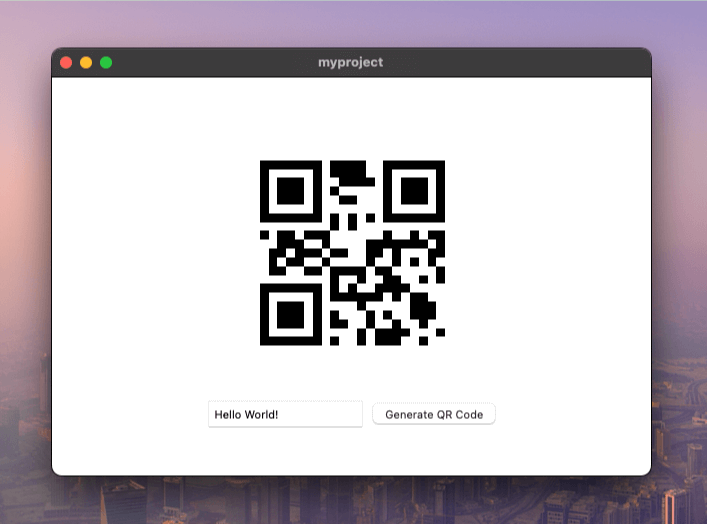
輸入一些文字,然後按一下「產生 QR 碼」按鈕。您應該會在頁面中央看到 QR 碼:
替代方法:HTTP 處理常式
到目前為止,我們已涵蓋以下內容:
- 建立新服務
- 產生繫結
- 在前端程式碼中使用繫結
為什麼要使用 HTTP 處理常式?
方法繫結很適合用於資料操作,但若要提供檔案、圖片或其他媒體,還有另一種做法。您不必將所有內容轉換成 base64 並透過繫結傳送,而是可以讓服務像小型網頁伺服器一樣運作。
這適用於下列情況:
- 您要提供圖片、影片或大型檔案
- 您想使用具有
src屬性的標準 HTML<img>或<video>標籤 - 您需要透過 URL 直接存取資源
如果您的服務實作 Go 的標準ServeHTTP(w http.ResponseWriter, r *http.Request)方法,Wails 就能將它公開為 HTTP 端點。讓我們擴充 QR Code 服務以支援此功能:
package main

import (
    "net/http"
    "strconv"

    "github.com/skip2/go-qrcode"
)

// QRService handles QR code generation
type QRService struct {
    // We can add state here if needed
}

// NewQRService creates a new QR service
func NewQRService() *QRService {
    return &QRService{}
}

// Generate creates a QR code from the given text
func (s *QRService) Generate(text string, size int) ([]byte, error) {
    // Generate the QR code
    qr, err := qrcode.New(text, qrcode.Medium)
    if err != nil {
        return nil, err
    }

    // Convert to PNG
    png, err := qr.PNG(size)
    if err != nil {
        return nil, err
    }

    return png, nil
}

func (s *QRService) ServeHTTP(w http.ResponseWriter, r *http.Request) {
    // Extract the text parameter from the request
    text := r.URL.Query().Get("text")
    if text == "" {
        http.Error(w, "Missing 'text' parameter", http.StatusBadRequest)
        return
    }
    // Extract Size parameter from the request
    sizeText := r.URL.Query().Get("size")
    if sizeText == "" {
        sizeText = "256"
    }
    size, err := strconv.Atoi(sizeText)
    if err != nil {
        http.Error(w, "Invalid 'size' parameter", http.StatusBadRequest)
        return
    }

    // Generate the QR code
    qrCodeData, err := s.Generate(text, size)
    if err != nil {
        http.Error(w, err.Error(), http.StatusInternalServerError)
        return
    }

    // Write the QR code data to the response
    w.Header().Set("Content-Type", "image/png")
    w.Write(qrCodeData)
}
此處的運作方式:
ServeHTTP是 Go 用於處理 HTTP 請求的標準介面- 我們從 URL 剖析查詢參數(
?text=hello&size=256) - 我們呼叫現有的
Generate()方法來建立 QR Code - 我們將內容類型設為
image/png,讓瀏覽器知道這是圖片 - 我們將原始 PNG 位元組直接寫入回應,不需要 base64!
現在更新main.go,指定可存取 QR Code 服務的路由:
 func main() {

     app := application.New(application.Options{
         Name:        "myproject",
         Description: "A demo of using raw HTML & CSS",
         LogLevel:    slog.LevelDebug,
         Services: []application.Service{
             application.NewServiceWithOptions(NewQRService(), application.ServiceOptions{
                 Route: "/qrservice",
             }),
         },
         Assets: application.AssetOptions{
             Handler: application.AssetFileServerFS(assets),
         },
         Mac: application.MacOptions{
             ApplicationShouldTerminateAfterLastWindowClosed: true,
         },
     })

     app.Window.NewWithOptions(application.WebviewWindowOptions{
         Title:  "myproject",
         Width:  600,
         Height: 400,
     })

     // Run the application. This blocks until the application has been exited.
     err := app.Run()

     // If an error occurred while running the application, log it and exit.
     if err != nil {
         log.Fatal(err)
     }
 }
此處的運作方式:
- 我們新增
application.ServiceOptions,設定服務的公開方式 Route: "/qrservice"讓您可在/qrservice存取 HTTP 處理常式- 現在,任何傳送至
/qrservice?text=hello的請求都會呼叫我們的ServeHTTP方法 - 若未設定
Route,HTTP 處理常式功能會停用
最後,更新main.js,改用簡單的圖片src,而不使用 base64 編碼:
async function generateQR() {
    const text = document.getElementById('text').value;
    if (!text) {
        alert('Please enter some text');
        return;
    }

    const img = document.getElementById('qrcode');
    // Make the image source the path to the QR code service, passing the text
    img.src = `/qrservice?text=${encodeURIComponent(text)}`
}

export function initializeQRGenerator() {
    const button = document.getElementById('generateButton');
    if (button) {
        button.addEventListener('click', generateQR);
    } else {
        console.error('Generate button not found');
    }
}
此處的運作方式:
- 我們移除了匯入項目和
await QRService.Generate()呼叫 - 我們改為直接將
img.src設為指向 HTTP 端點 encodeURIComponent()會安全地逸出 URL 中的特殊字元- 設定
src後,瀏覽器會自動發出 HTTP GET 請求 - 對圖片而言,這種方式更簡單、更有效率,而且不需要轉換成 base64!
再次執行應用程式後,應該會產生相同的 QR Code:
支援動態設定
硬式編碼路由的問題:
在上述範例中,我們在 JavaScript 程式碼裡使用了硬式編碼的路由/qrservice。 這會讓 Go 設定與前端程式碼緊密耦合。
如果您編輯main.go並變更Route選項,卻沒有更新main.js, 應用程式將會出錯:
        // ...
            application.NewServiceWithOptions(NewQRService(), application.ServiceOptions{
                Route: "/services/qr",
            }),
        // ...
硬式編碼的路由適用於簡單的應用程式,但會使程式碼變得脆弱且更難維護。
解決方案:動態設定
方法繫結與 HTTP 處理常式可以搭配使用!我們可以透過繫結告知前端該使用哪個路由,使設定成為動態設定,並消除硬式編碼的路徑。
其運作方式如下:
- 應用程式啟動時會執行
ServiceStartup生命週期方法 - 我們儲存選項中設定的路由
- 我們新增一個
URL()方法,讓前端能呼叫此方法以取得正確的路由 - 現在,前端會向 Go 服務查詢其路由,而不再自行猜測
首先,實作ServiceStartup介面並新增URL方法:
package main

import (
    "context"
    "net/http"
    "net/url"
    "strconv"

    "github.com/skip2/go-qrcode"
    "github.com/wailsapp/wails/v3/pkg/application"
)

// QRService handles QR code generation
type QRService struct {
    route string
}

// NewQRService creates a new QR service
func NewQRService() *QRService {
    return &QRService{}
}

// ServiceStartup runs at application startup.
func (s *QRService) ServiceStartup(ctx context.Context, options application.ServiceOptions) error {
    s.route = options.Route
    return nil
}

// Generate creates a QR code from the given text
func (s *QRService) Generate(text string, size int) ([]byte, error) {
    // Generate the QR code
    qr, err := qrcode.New(text, qrcode.Medium)
    if err != nil {
        return nil, err
    }

    // Convert to PNG
    png, err := qr.PNG(size)
    if err != nil {
        return nil, err
    }

    return png, nil
}

// URL returns an URL that may be used to fetch
// a QR code with the given text and size.
// It returns an error if the HTTP handler is not available.
func (s *QRService) URL(text string, size int) (string, error) {
    if s.route == "" {
        return "", errors.New("http handler unavailable")
    }

    return fmt.Sprintf("%s?text=%s&size=%d", s.route, url.QueryEscape(text), size), nil
}

func (s *QRService) ServeHTTP(w http.ResponseWriter, r *http.Request) {
    // Extract the text parameter from the request
    text := r.URL.Query().Get("text")
    if text == "" {
        http.Error(w, "Missing 'text' parameter", http.StatusBadRequest)
        return
    }
    // Extract Size parameter from the request
    sizeText := r.URL.Query().Get("size")
    if sizeText == "" {
        sizeText = "256"
    }
    size, err := strconv.Atoi(sizeText)
    if err != nil {
        http.Error(w, "Invalid 'size' parameter", http.StatusBadRequest)
        return
    }

    // Generate the QR code
    qrCodeData, err := s.Generate(text, size)
    if err != nil {
        http.Error(w, err.Error(), http.StatusInternalServerError)
        return
    }

    // Write the QR code data to the response
    w.Header().Set("Content-Type", "image/png")
    w.Write(qrCodeData)
}
此處的運作方式:
- 我們新增了
route欄位,用來儲存ServiceStartup中設定的路由 - 應用程式啟動時會呼叫
ServiceStartup(ctx, options),我們在此儲存路由 URL()方法會使用查詢參數建構完整 URL- 如果沒有設定路由(路由為空),我們會傳回錯誤
url.QueryEscape()會安全地編碼文字,以便在 URL 中使用- 前端可透過繫結使用此方法
現在更新main.js,改用URL方法取代硬式編碼的路徑:
import { QRService } from "./bindings/changeme";

async function generateQR() {
    const text = document.getElementById('text').value;
    if (!text) {
        alert('Please enter some text');
        return;
    }

    const img = document.getElementById('qrcode');
    // Invoke the URL method to obtain an URL for the given text.
    img.src = await QRService.URL(text, 256);
}

export function initializeQRGenerator() {
    const button = document.getElementById('generateButton');
    if (button) {
        button.addEventListener('click', generateQR);
    } else {
        console.error('Generate button not found');
    }
}
此處的運作方式:
- 我們匯入
QRService,以便再次使用繫結 - 我們不再將
/qrservice硬式編碼,而是呼叫await QRService.URL(text, 256) - Go 服務會使用正確的路由和參數建構 URL
- 現在,如果您變更
main.go中的路由,前端會自動使用新路由 - 不再需要手動同步 Go 設定與前端程式碼!
其運作方式應與前一個範例完全相同, 但變更main.go中的服務路由時, 前端不會再因此出錯。