

更新程式
Wails v3 的應用程式內自我更新功能——支援可插拔的提供者、密碼學驗證、原子交換,以及可自訂主題或替換的預設使用者介面。
更新程式可在應用程式內發布軟體更新,無須自行建置下載/驗證/交換管線。它建構於app.Updater之上,可接受一或多個可插拔的Provider(GitHub Releases、keygen.sh、Sparkle AppCast、開放的 Wails Update Manifest 通訊協定,或您自己的實作),依照設定的公開金鑰驗證下載內容,安全地交換執行中的二進位檔,並透過標準 Wails 事件匯流排公開每次狀態轉換。
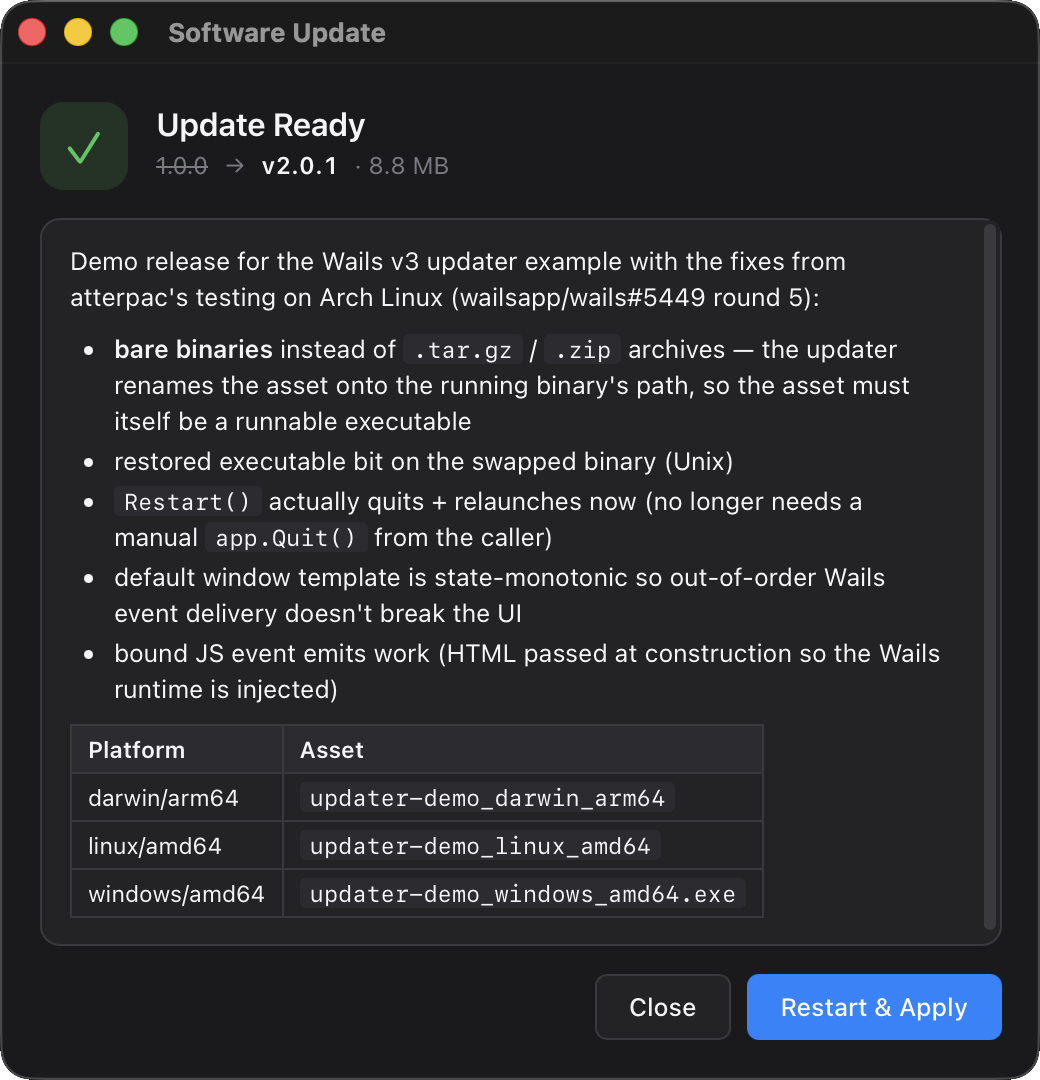
快速開始
package main

import (
    "context"
    "log"

    "github.com/wailsapp/wails/v3/pkg/application"
    "github.com/wailsapp/wails/v3/pkg/updater"
    "github.com/wailsapp/wails/v3/pkg/updater/providers/github"
)

func main() {
    app := application.New(application.Options{Name: "Demo"})

    gh, _ := github.New(github.Config{Repository: "myorg/myapp"})
    if err := app.Updater.Init(updater.Config{
        CurrentVersion: "1.0.0",
        Providers:      []updater.Provider{gh},
    }); err != nil {
        log.Fatal(err)
    }

    if err := app.Updater.CheckAndInstall(context.Background()); err != nil {
        log.Printf("update: %v", err)
    }

    _ = app.Run()
}
這會開啟框架的更新視窗、檢查 GitHub、下載對應平台的成品、加以驗證、交換二進位檔,然後等待使用者重新啟動。
生命週期
app.Updater是一個具有下列狀態的狀態機(updater.State):
| 狀態 | 時機 |
|---|---|
unconfigured |
呼叫Init之前 |
idle |
呼叫Init之後、進行任何檢查之前 |
checking |
Check正在進行中 |
up-to-date |
最新的提供者回應指出呼叫端已是最新版本 |
available |
已找到新版本,但尚未開始下載 |
downloading |
正在從提供者串流位元組 |
verifying |
下載完成,正在檢查簽章/摘要 |
installing |
正在解封裝已驗證的位元組,並重新命名後移入暫存目錄 |
ready |
更新已暫存;呼叫Restart以套用 |
error |
先前任何步驟失敗 |
您可以隨時透過app.Updater.State()讀取目前狀態。每次狀態轉換也會發出 Wails 事件(請參閱事件)。
Restart 會等待輔助處理程序執行到 application.New,才要求正在執行的應用程式結束。預設啟動逾時為 30 秒。若應用程式在 application.New 之前需要較長時間進行初始化,請將 Config.HelperReadyTimeout 設為較長的時間,例如 time.Minute。零值使用預設值;負的時間長度會被拒絕。若啟動逾時,Restart 會傳回 updater.ErrHelperNotReady,並保持目前的應用程式開啟。
更新會暫存在已安裝執行檔旁邊(macOS 上位於 .app 套件旁邊)的 wails-update-* 目錄中,因此該目錄必須可寫入。
在 AppImage 中,更新程式會取代並重新啟動 $APPIMAGE 所指向的 .AppImage 檔案,而不是唯讀掛載。
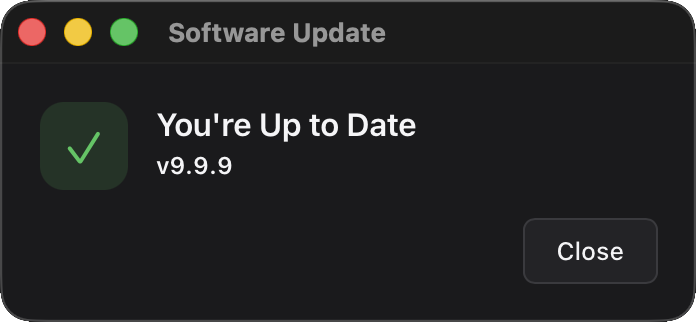
預設視窗會自動反映目前狀態——例如,當Check傳回沒有可用的升級時,使用者會看到以下畫面,並使用關閉將其關閉:
提供者
任何符合此介面的項目都可作為Provider:
type Provider interface {
    Name() string
    Check(ctx context.Context, req CheckRequest) (*Release, error)
    Download(ctx context.Context, r *Release, dst io.Writer, onProgress func(written, total int64)) error
}
原始碼樹內附四種實作。
GitHub Releases — updater/providers/github
gh, err := github.New(github.Config{
    Repository:    "myorg/myapp",     // your owner/repo (required)
    Token:         "ghp_…",           // optional; raises rate limit + private repos
    Prerelease:    false,             // include pre-releases in latest lookup
    ChecksumAsset: "SHA256SUMS",      // optional sibling asset for digest verification
    BaseURL:       "",                // optional override (e.g. GitHub Enterprise)
    AssetMatcher:  nil,               // optional custom asset-picker; nil uses DefaultAssetMatcher
    HTTPClient:    nil,               // optional client override
})預設的成品比對器會依檔名中的GOOS + GOARCH子字串進行選取,並可辨識常見別名(amd64 / x86_64 / x64、arm64 / aarch64、386 / i386 / x86 / ia32)。若使用自訂命名方式:
gh, _ := github.New(github.Config{
    Repository: "myorg/myapp",
    AssetMatcher: func(req updater.CheckRequest, assets []github.ReleaseAsset) int {
        for i, a := range assets {
            if strings.Contains(a.Name, "my-naming-convention") &&
               strings.Contains(a.Name, req.Platform) {
                return i
            }
        }
        return -1 // no match
    },
})ChecksumAsset是同一版本中另一個成品的名稱,其內容為<sha256> <filename>格式的各行(即sha256sum與shasum -a 256產生的格式)。提供者會在Check期間擷取該成品,尋找與所選成品相符的行,並填入Release.Verification.Digest,讓框架驗證下載內容。
keygen.sh — updater/providers/keygen
kg, err := keygen.New(keygen.Config{
    Account:    "your-account-slug", // required
    Product:    "product-uuid",      // optional but recommended when account has multiple products
    Package:    "",                  // optional further narrowing
    Channel:    "stable",            // "stable" / "rc" / "beta" / "alpha" / "dev"
    Filetype:   "",                  // optional artifact filetype filter ("dmg", "exe", …)
    Token:      "prod-…",            // product / environment / user / admin token; wins over LicenseKey
    LicenseKey: "",                  // license key auth (used only when Token is empty)
    BaseURL:    "",                  // optional API base override
    HTTPClient: nil,                 // optional client override; redirect-strip wrapper still applied
})
提供者會自動將 keygen.sh 各成品的 SHA-512總和檢查碼與 Ed25519ph 簽章對應至框架的Release.Verification區塊,無須額外接線。
權杖格式:keygen.sh 權杖包含角色前綴(admi- / prod- / envi- / user-)。您在控制台中看到的原始 UUID 是權杖的識別碼,而不是其祕密值;祕密值只會在建立權杖時顯示。如需詳細資訊,請參閱 keygen.sh 的驗證文件。
Sparkle AppCast — updater/providers/appcast
ac, err := appcast.New(appcast.Config{
    URL:        "https://your.app/appcast.xml", // required
    Channel:    "stable",                       // optional sparkle:channel filter
    HTTPClient: nil,                            // optional client override
})
可直接置入現有的 Sparkle / WinSparkle 基礎架構,無須進行任何變更。它會從更新資訊源中讀取sparkle:shortVersionString、<enclosure url type length sparkle:os sparkle:edSignature>和sparkle:channel。
不支援 Sparkle 1的 DSA 簽章(sparkle:dsaSignature);使用該簽署機制的專案應輪替至 EdDSA(Sparkle 2)。
Wails 更新資訊清單 — updater/providers/endpoint
ep, err := endpoint.New(endpoint.Config{
    URL:        "https://updates.example.com/check", // required; supports {{platform}} / {{arch}} / {{version}} / {{channel}} placeholders
    Channel:    "stable",                            // optional channel filter
    Headers:    nil,                                 // optional headers, e.g. {"Authorization": "License <key>"}
    HTTPClient: nil,                                 // optional client override; redirect-strip wrapper still applied
})使用開放的Wails Update Manifest 通訊協定:以單一 JSON 文件描述最新版本及其各平台成品,並內嵌總和檢查碼與簽章。同一份文件既可用於靜態檔案主機(S3、GitHub Pages 或任何 CDN——為每個通道發布一份列出所有平台的資訊清單),也可用於動態更新伺服器(提供者會在每次檢查時傳送platform、arch、version和channel,因此伺服器可只傳回一個成品,或依授權決定是否允許更新)。
URL 預留位置可讓靜態配置只需一行設定:
ep, _ := endpoint.New(endpoint.Config{
    URL: "https://cdn.example.com/updates/{{platform}}/{{arch}}/stable.json",
})每次資訊清單要求都會傳送已設定的標頭;只有在成品位於資訊清單本身的主機,且未從https降級至http時,下載成品才會重複使用這些標頭;若重新導向跨來源或會造成降級,則會移除Authorization標頭。
發布端由 CLI 負責:wails3 updater manifest可用一個命令計算摘要、簽署並描述您的版本檔案,而wails3 updater verify會在您上傳前重新檢查結果。請參閱使用 wails3 CLI 發布。
後援鏈
Config.Providers具有順序。更新程式會依序走訪:第一個傳回版本的提供者優先採用;第一個回報「已是最新版本」的提供者會使整條鏈短路(後援是用於「主要提供者無法連線」,而不是「提供者之間意見不一致」)。若發生錯誤,則繼續嘗試下一個提供者。
app.Updater.Init(updater.Config{
    CurrentVersion: "1.0.0",
    Providers: []updater.Provider{
        kg, // primary: licensed customers
        gh, // fallback: public mirror
    },
})
撰寫您自己的提供者
典型實作只需三個方法、約150行程式碼。Updater 負責驗證、不可分割的暫存、置換與視窗;提供者程式碼則解析下一個版本並以串流傳輸其位元組:
type CustomProvider struct { /* config */ }

func (p *CustomProvider) Name() string { return "custom" }

func (p *CustomProvider) Check(ctx context.Context, req updater.CheckRequest) (*updater.Release, error) {
    // Hit your update endpoint, decide whether req.CurrentVersion is current,
    // and return either nil (no upgrade) or a *Release with Artifact + optional
    // Verification populated.
    // Errors here drop through to the next provider in Config.Providers.
}

func (p *CustomProvider) Download(ctx context.Context, r *updater.Release, dst io.Writer, onProgress func(int64, int64)) error {
    // Stream the artifact's bytes to dst. Call onProgress(written, total) as
    // bytes flow past; the Updater debounces emits to ~10 Hz on the event bus.
}
請參考原始碼樹內的提供者;每個提供者都只有一個 Go 檔案。
密碼學驗證
框架的驗證器會以Config.PublicKey作為信任根,驗證發行版本:
//go:embed publickey.pem
var publicKey []byte

app.Updater.Init(updater.Config{
    CurrentVersion: "1.0.0",
    Providers:      []updater.Provider{...},
    PublicKey:      publicKey,
})支援的演算法(Release.Verification.SignatureAlgo):
| 演算法 | 簽署內容 | 備註 |
|---|---|---|
ed25519 |
成品的 SHA-256摘要 | 供 Sparkle EdDSA 使用 |
ed25519ph |
透過 Ed25519ph 的預先雜湊簽署完整成品(內部使用 SHA-512) | 供 keygen.sh 使用 |
ecdsa-p256 |
成品的 SHA-256摘要 | 接受原始r∥s與 DER 簽章 |
此外,當發行版本附有雜湊但沒有簽章時,也支援僅摘要驗證(DigestAlgo:sha256 / sha512)。
Config.PublicKey是簽章驗證唯一的信任錨點;發行來源無法換成自己的金鑰。若發行版本帶有Signature,但未設定Config.PublicKey,驗證器會採取封閉式失敗並拒絕該版本。驗證器會在下載期間以單次串流處理計算摘要,因此即使更新有數 GB,驗證也不會增加額外的磁碟掃描。
產生簽署金鑰
wails3 updater genkey
# updater.key       — keep secret, use to sign releases
# updater.key.pub   — bundle in your app via go:embed
私密金鑰採用 PKCS#8 PEM,公開金鑰採用 PKIX PEM;Config.PublicKey可直接接受.pub檔案(也接受原始的32位元組金鑰或其 base64 形式;genkey會輸出後者,供內嵌使用)。請使用wails3 updater manifest -key updater.key ...或wails3 updater sign簽署發行版本;請參閱使用 wails3 CLI 發布。
也可以在 Go 中執行:
import "crypto/ed25519"
import "crypto/rand"

pub, priv, _ := ed25519.GenerateKey(rand.Reader)
// Persist `priv` securely (HSM, signing CI, etc.); embed `pub` in your binary.
成品格式
提供者會以串流傳輸您所發布檔案的位元組;框架接著會在置換前將其解封裝:
- 單一二進位檔(例如
myapp-linux-amd64)— 直接使用,不做處理。常見於 Linux。 .zip— 就地解壓縮。封存檔必須恰好包含一個頂層項目(通常是 macOS.app套件組合或單一二進位檔)。這是 macOS 的建議封裝方式。.tar.gz/.tgz— 依照相同的單一頂層項目規則就地解壓縮。適用於將執行階段目錄樹與二進位檔一併發布的 Linux 發行版。
包含多個頂層項目的封存檔會遭拒絕:框架只會置換磁碟上的單一目標,因此當封存檔包含多個項目時,「將此封存檔置換到位」的含義並不明確。v1 不支援.dmg和.pkg(macOS),也不支援.msi(Windows);請改為發布該套件組合的.zip。解壓縮會強制防範 Zip Slip、拒絕指向封存檔根目錄之外的符號連結,並限制未壓縮內容的總大小(2 GiB)與項目數量(50 000)。
預設視窗
app.Updater.CheckAndInstall(ctx)會開啟一個由框架管理、大小為520×540的視窗,其中包含:
- 依狀態變化的主視覺圖示(有可用更新/正在下載時為藍色 ↓,準備就緒/已是最新版本時為綠色 ✓,發生錯誤時為紅色 !)
- 版本膠囊標籤:
v1.0.0 → v2.0.1 · 8.8 MB - 可捲動的版本資訊面板,其中包含轉譯後的 Markdown(段落、粗體/斜體、清單、GFM 表格、行內程式碼、圍欄式程式碼區塊、h1–h3、連結)
- 每種狀態只顯示一個主要動作(安裝/重新啟動並套用/再試一次)
- 幽靈樣式的次要動作(略過此版本/稍後提醒我)
- 透過
prefers-color-scheme切換深色/淺色模式 - 總大小未知時顯示不確定進度的微光動畫
它會在 Wails 事件匯流排上接聽updater:*事件,並將updater:user:*動作傳回 Go。
透過 CSS 變數設定佈景主題
app.Updater.Init(updater.Config{
    // …
    Window: &updater.BuiltinWindow{
        CSS: `:root { --accent: #ff6f00; --bg: #1a1a1a; --fg: #fafafa; }`,
    },
})
預設樣式表公開下列變數,您可以覆寫其中任何一個:
| 變數 | 預設值(淺色) | 預設值(深色) |
|---|---|---|
--bg |
#f8f8fa |
#1a1a1c |
--surface |
#ffffff |
#232326 |
--surface-2 |
#f0f0f3 |
#2c2c30 |
--fg |
#1d1d1f |
#f5f5f7 |
--fg-dim |
#6b6b73 |
#b0b0b8 |
--fg-faint |
#99999f |
#7a7a82 |
--border |
#d6d6dc |
#3a3a3e |
--accent |
#0a84ff |
#0a84ff |
--accent-fg |
#ffffff |
— |
--success |
#34c759 |
— |
--error |
#ff3b30 |
— |
--radius |
10px |
— |
--font |
系統字型堆疊 | — |
取代範本
提供您自己的 HTML;它只需要接聽wails:updater:*事件並發出wails:updater:user:*動作:
app.Updater.Init(updater.Config{
    // …
    Window: &updater.BuiltinWindow{
        HTML: myCustomTemplate,
    },
})
InitialHTML 視窗載入時沒有資產伺服器來源,因此無法動態擷取/wails/runtime.js。您有兩種方式可讓這類視窗與主機通訊:
- 直接撰寫 HTML。對於任何以
WebviewWindowOptions.AllowSimpleEventEmit = true開啟且已設定HTML的視窗,框架都會自動注入精簡的window.wails.Events墊片;更新程式的內建與 BYO 路徑正是如此。不需要建置步驟。下方範例採用的就是此路徑。 - 使用您偏好的打包工具(Vite、esbuild、Rollup)打包
@wailsio/runtime,並在建置時將其匯入自訂 HTML。Events.On完全在用戶端運作,因此開箱即用;Events.Emit則會經過執行階段的 fetch 傳輸,而 null 來源會使其失效。因此,請透過執行階段的setTransport掛鉤安裝一個精簡的 postMessage 傳輸,使其經由window._wails.invoke("wails:event:emit:<name>")路由。如果window.wails.Events已在作用域內,框架注入不會執行任何操作,因此兩種方法不會互相衝突。
無論採用哪種方式,您在自訂 HTML 中撰寫的 JS 都會呼叫相同的Events.On/Events.EmitAPI:
<script>
const { On, Emit } = window.wails.Events;

On("wails:updater:update-available", (e) => {
    const rel = e.data ?? e;
    document.getElementById("ver").textContent = rel.version;
});

document.getElementById("install").addEventListener("click",
    () => Emit("wails:updater:user:install"));

// Ask the host to replay the current state so we paint correctly on (re)open.
Emit("wails:updater:window:ready");
</script>此墊片會公開以裸名稱使用事件所需的現代執行階段功能子集:Events.On(name, cb)會傳回取消訂閱函式,而Events.Emit(nameOrEventObject)則透過受管控的wails:event:emit:postMessage 路徑路由至主機。它會在頁面載入時安裝一次,且早於您的任何行內指令碼執行。
如果您想要覆寫此墊片(或透過其他方式載入完整執行階段),請在頁面的第一個<script>標籤執行前設定window.wails.Events,注入程序便會自行略過。
視窗外觀
無須修改 HTML,即可覆寫視窗選項(大小、無框架、永遠置頂):
Window: &updater.BuiltinWindow{
    Options: updater.WindowOptions{
        Title:         "My App Updater",
        Width:         640,
        Height:        480,
        Frameless:     true,
        AlwaysOnTop:   true,
        DisableResize: false,
    },
},
使用您自己的視窗
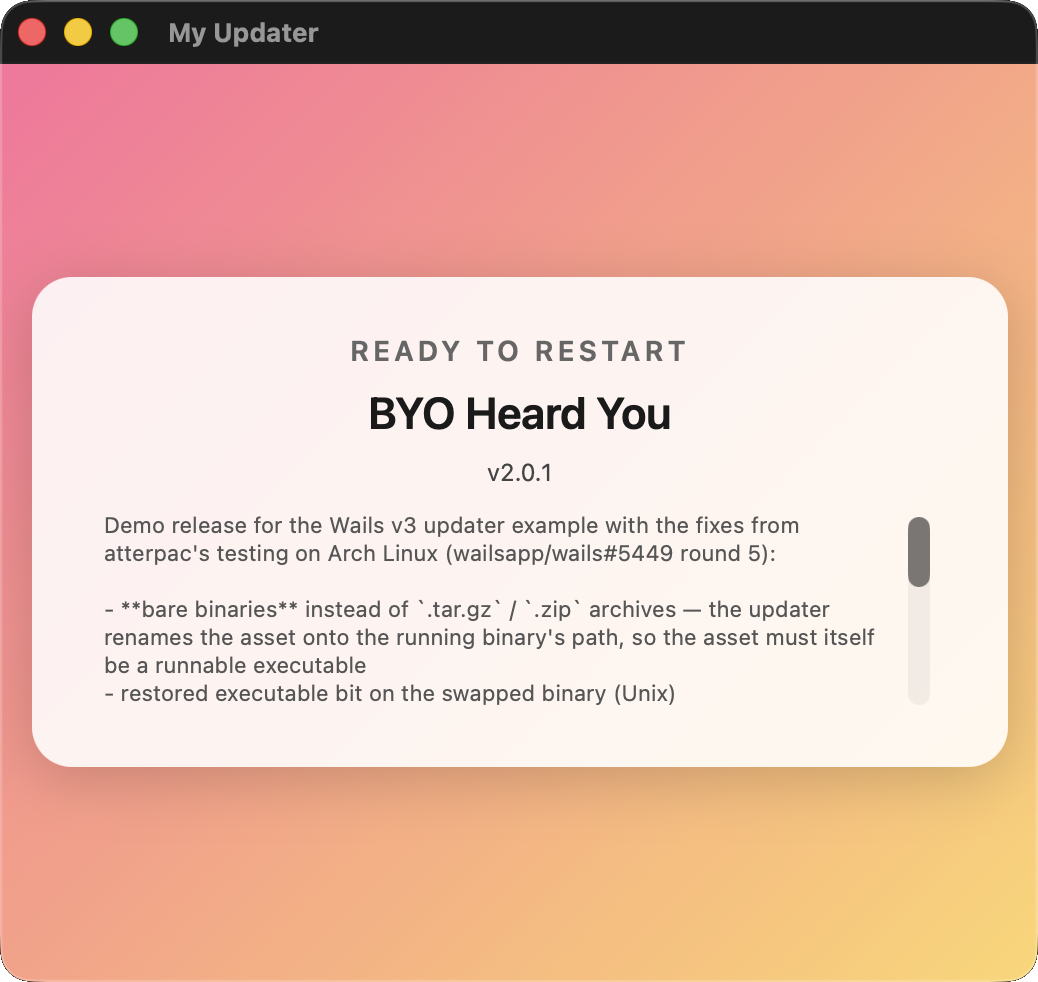
使用您自行建立的*application.WebviewWindow來驅動更新流程。更新程式會在您的視窗上呼叫Show()/Close()/EmitEvent(),而您的 HTML 則決定要呈現的內容:
myWin := app.Window.NewWithOptions(application.WebviewWindowOptions{
    Title:                "My Updater",
    Width:                520, Height: 460,
    HTML:                 myCustomHTML,
    AllowSimpleEventEmit: true,           // see security note below
})
app.Updater.Init(updater.Config{
    // …
    Window: updater.BYOWindow(myWin.AsUpdaterWindow()),
})
您的 HTML 會像內建範本一樣使用window.wails.Events.On/Events.Emit;只要視窗設有AllowSimpleEventEmit: true,框架自動注入的墊片就會隨之提供,不論該視窗是由框架擁有還是由您擁有。API 請參閱取代範本。
無介面模式
app.Updater.Init(updater.Config{
    // …
    Window: updater.WindowNone,
})
完全不會開啟任何視窗。請從您自己的 UI(或現有的主視窗)訂閱updater:*事件,並從按鈕處理常式呼叫app.Updater.CheckAndInstall(ctx)。這適合定期在背景檢查,且只應在找到更新時才顯示提示的情境;也適合將更新流程整合至自訂設定面板的應用程式。
事件
Go 和 JavaScript 都透過標準 Wails 事件匯流排訂閱。請勿手動輸入傳輸字串;請使用更新程式套件(Go)或執行階段套件(JS)匯出的常數。兩層使用同一組名稱,並透過迴歸測試保持同步。
從 Go
常數位於github.com/wailsapp/wails/v3/pkg/updater。請透過app.Event.On(name, fn)訂閱;回呼會收到一個*application.CustomEvent,其Data欄位是事件參考中列出的具型別承載資料。請進行型別斷言,不要進行 JSON 解碼:
import (
    "log"

    "github.com/wailsapp/wails/v3/pkg/application"
    "github.com/wailsapp/wails/v3/pkg/updater"
)

// …

app.Event.On(updater.EventUpdateAvailable, func(e *application.CustomEvent) {
    rel, ok := e.Data.(*updater.Release)
    if !ok { return }
    log.Printf("update found: %s", rel.Version)
})

app.Event.On(updater.EventDownloadProgress, func(e *application.CustomEvent) {
    p, ok := e.Data.(updater.Progress)
    if !ok { return }
    log.Printf("%d / %d bytes (%.0f KB/s)", p.Written, p.Total, p.Rate/1024)
})

app.Event.On(updater.EventError, func(e *application.CustomEvent) {
    info, ok := e.Data.(updater.ErrorInfo)
    if !ok { return }
    log.Printf("update failed during %s: %s", info.Stage, info.Message)
})
所有可用的 Go 常數:
| 常數 | 傳輸字串 |
|---|---|
updater.EventCheckStarted |
wails:updater:check-started |
updater.EventUpdateAvailable |
wails:updater:update-available |
updater.EventNoUpdate |
wails:updater:no-update |
updater.EventDownloadStarted |
wails:updater:download-started |
updater.EventDownloadProgress |
wails:updater:download-progress |
updater.EventDownloadComplete |
wails:updater:download-complete |
updater.EventVerifying |
wails:updater:verifying |
updater.EventInstalling |
wails:updater:installing |
updater.EventUpdateReady |
wails:updater:update-ready |
updater.EventError |
wails:updater:error |
updater.EventMeta |
wails:updater:meta |
updater.EventWindowReady |
wails:updater:window:ready |
updater.EventUserInstall |
wails:updater:user:install |
updater.EventUserSkip |
wails:updater:user:skip |
updater.EventUserRemind |
wails:updater:user:remind |
updater.EventUserCancel |
wails:updater:user:cancel |
updater.EventUserRestart |
wails:updater:user:restart |
從 JavaScript
這些常數位於@wailsio/runtime中的Updater.Events下。其名稱與 Go 相同,並依子命名空間(User.*、Window.*)分類,方便透過自動完成找到:
import { Events, Updater } from "@wailsio/runtime";

Events.On(Updater.Events.UpdateAvailable, (e) => {
    console.log("update found:", e.data.version);
});

Events.On(Updater.Events.DownloadProgress, (e) => {
    const p = e.data;
    console.log(`${p.written} / ${p.total} bytes (${(p.rate/1024).toFixed(1)} KB/s)`);
});

Events.On(Updater.Events.Error, (e) => {
    const info = e.data;
    console.error(`update failed during ${info.stage}: ${info.message}`);
});
自訂 HTML 傳回主機的使用者操作事件位於Updater.Events.User下:
import { Updater } from "@wailsio/runtime";

document.getElementById("install-btn").addEventListener("click", () => {
    // The framework window does this internally via the postMessage shim;
    // shown here for BYO templates that need to drive the flow themselves.
    window._wails.invoke("wails:event:emit:" + Updater.Events.User.Install);
});
事件參考
訂閱端(主機 → 頁面):
| 常數(Go) | 常數(JS) | 承載資料 | 時機 |
|---|---|---|---|
updater.EventCheckStarted |
Updater.Events.CheckStarted |
無 | 每次Check往返之前 |
updater.EventUpdateAvailable |
Updater.Events.UpdateAvailable |
*Release |
Check找到較新的版本 |
updater.EventNoUpdate |
Updater.Events.NoUpdate |
無 | Check確認已是最新版本 |
updater.EventDownloadStarted |
Updater.Events.DownloadStarted |
*Release |
位元組開始串流傳輸 |
updater.EventDownloadProgress |
Updater.Events.DownloadProgress |
Progress |
下載期間約為10 Hz |
updater.EventDownloadComplete |
Updater.Events.DownloadComplete |
*Release |
所有位元組均已寫入、驗證之前 |
updater.EventVerifying |
Updater.Events.Verifying |
*Release |
開始檢查簽章/摘要 |
updater.EventInstalling |
Updater.Events.Installing |
*Release |
開始解壓縮並暫存 |
updater.EventUpdateReady |
Updater.Events.UpdateReady |
*Release |
等待重新啟動 |
updater.EventError |
Updater.Events.Error |
ErrorInfo |
任一階段失敗 |
updater.EventMeta |
Updater.Events.Meta |
Meta |
每個工作階段一次,在重播快照之前 |
頁面端(頁面 → 主機)— 若您撰寫自訂範本,您的程式碼會訂閱這些事件:
| 常數(Go) | 常數(JS) | 時機 |
|---|---|---|
updater.EventWindowReady |
Updater.Events.Window.Ready |
視窗載入完成;主機端會重送目前狀態 |
updater.EventUserInstall |
Updater.Events.User.Install |
available狀態下的主要動作 |
updater.EventUserRestart |
Updater.Events.User.Restart |
ready狀態下的主要動作 |
updater.EventUserSkip |
Updater.Events.User.Skip |
「略過此版本」 |
updater.EventUserRemind |
Updater.Events.User.Remind |
「稍後提醒我」 |
updater.EventUserCancel |
Updater.Events.User.Cancel |
關閉按鈕 |
API 參考
updater.Config
| 欄位 | 型別 | 備註 |
|---|---|---|
CurrentVersion |
string |
必填。 與發布版本所用標籤相同的字串(不含v前綴) |
Providers |
[]updater.Provider |
必填。 依序使用的備援鏈 |
PublicKey |
[]byte |
PEM 或原始位元組。選填,但若未提供此項,將拒絕安裝已簽署的發行版本 |
CheckInterval |
time.Duration |
非零值會啟動背景輪詢迴圈並呼叫CheckAndInstall |
Platform |
string |
覆寫runtime.GOOS以選取資產 |
Arch |
string |
覆寫runtime.GOARCH以選取資產 |
Channel |
string |
目前僅供參考;由提供者篩選特定頻道 |
Window |
updater.WindowOption |
nil(內建預設值)、&BuiltinWindow{…}、BYOWindow(handle)或WindowNone |
*updater.Updater的方法
| 簽章 | 用途 |
|---|---|
Init(cfg Config) error |
進行設定。第二次呼叫時傳回ErrAlreadyConfigured |
State() State |
目前的生命週期階段 |
CurrentVersion() string |
傳入Init的版本 |
Check(ctx) (*Release, error) |
依序走訪提供者鏈。(rel, nil)=找到更新,(nil, nil)=已是最新版本,(nil, err)=全部失敗 |
DownloadAndInstall(ctx) error |
串流、驗證、解壓縮(若為封存檔)並暫存。必須先呼叫Check |
CheckAndInstall(ctx) error |
便利方法:開啟視窗、呼叫Check,若找到更新,再呼叫DownloadAndInstall |
Restart(ctx) error |
啟動輔助程式、呼叫Host.Quit後結束;輔助程式會置換檔案並重新啟動 |
DownloadedPath() string |
已暫存更新在磁碟上的位置;若無則為"" |
SkipVersion(v string) |
將v記錄為已略過;後續的Check會將其視為已是最新版本 |
SkippedVersion() string |
讀取目前略過的版本 |
StopPeriodicCheck() |
取消由Config.CheckInterval啟動的計時器,並等待迴圈返回 |
錯誤
| 哨兵值 | 傳回來源 |
|---|---|
ErrAlreadyConfigured |
首次成功後的Init |
ErrNotConfigured |
在Init之前執行的任何操作 |
ErrNoPendingRelease |
未先執行Check便執行DownloadAndInstall |
ErrDownloadInProgress |
在另一個 DownloadAndInstall 呼叫仍在執行時呼叫DownloadAndInstall |
ErrNotReady |
沒有已暫存的更新時執行Restart |
交換的運作方式
Restart會設定哨兵環境變數,然後重新執行目前的二進位檔。application.New會在啟動時偵測這些變數,並轉入輔助程式模式:
- 輔助程式最多等待30秒,讓父程序 PID 結束(
platformIsAlive在 Windows 上透過syscall.OpenProcess+GetExitCodeProcess輪詢,在 Unix 上則透過os.FindProcess+proc.Signal(syscall.Signal(0))輪詢)。 - 輔助程式會備份目標(檔案採複製;macOS
.app套件目錄則採遞迴複製)。 - 輔助程式會以已暫存的成品取代目標,最多重試20次,每次嘗試之間採用500毫秒的退避時間:
- Unix —
os.RemoveAll(target)+os.Rename(newPath, target)。指向舊 inode 的已開啟檔案描述元仍然有效。 - Windows —
os.Rename(target, target.old.<nanos>)+os.Rename(newPath, target)。Windows 允許重新命名映像仍在對應中的檔案,但不允許刪除;下次更新時,輔助程式會清除所有殘留的.old.*同層項目,前提是擁有它們的核心對應已解除。
- 輔助程式會在新的二進位檔上還原原始可執行檔的模式(下載的檔案使用預設 umask 建立,因此在 Unix 上會移除
+x;在 Windows 上則不執行任何操作)。 - 輔助程式會清除輔助程式模式的環境變數,並重新啟動已完成取代的二進位檔。
- 輔助程式結束。
若啟動失敗,輔助程式會還原備份。若父程序未在30秒內結束,輔助程式會在接觸目標之前中止(因此,即使關閉對話方塊阻擋Quit,使用者仍可保有能正常運作的應用程式)。
對於以.zip散布的 macOS .app套件(建議的封裝方式),封存檔會在驗證完成與準備就緒之間解壓縮,讓輔助程式能以實際目錄進行交換。
定期檢查
app.Updater.Init(updater.Config{
    // …
    CheckInterval: 6 * time.Hour,
})當CheckInterval > 0時,背景 goroutine 會依設定的間隔呼叫CheckAndInstall。若另一個流程已在進行(檢查/下載/驗證/安裝),此時抵達的計時週期會被捨棄,因為不支援並行狀態機。
若要在背景靜默輪詢,並且只在找到更新時顯示內容,請設定Window: updater.WindowNone,並在您自己的 UI 中回應EventUpdateAvailable。
略過與稍後提醒
預設視窗的「略過此版本」按鈕會透過SkipVersion(rel.Version)記錄可用版本。後續的Check會找到相同版本,並將其視為已是最新版本(直到使用者更新CurrentVersion;成功執行Restart後會自動更新)。「稍後提醒我」只會關閉視窗,不會記錄任何內容。
// Reading what the user skipped (e.g. to surface in app settings)
if v := app.Updater.SkippedVersion(); v != "" {
    log.Printf("user skipped %s", v)
}

// Programmatically clearing the skip:
app.Updater.SkipVersion("")
散布檢查清單
發布將由更新程式安裝的版本之前:
- 選擇正確的封存格式。macOS:
.app套件的.zip。Linux:單一二進位檔或.tar.gz。Windows:單一.exe或.zip。不支援.dmg/.msi/.pkg。 - 為成品簽署,使用與
Config.PublicKey相符的私密金鑰。對於由提供者發布的資訊來源(keygen.sh、AppCast),請遵循各提供者的簽署工作流程。若 GitHub Releases 搭配ChecksumAsset,請使用sha256sum/shasum -a 256產生SHA256SUMS檔案。 - 確保版本字串相符。
Config.CurrentVersion必須與該版本的版本標籤完全相符(例如1.0.0↔ 標籤v1.0.0;提供者端會移除開頭的v)。 - 在目標平台上測試交換流程,發布前至少測試一次。程式碼簽署、公證及 Gatekeeper 處理方式因平台而異,更新程式本身不處理這些事項。
疑難排解
「簽章需要公開金鑰,但未設定任何公開金鑰」 — 此版本含有Signature欄位,但Config.PublicKey為空。請設定公開金鑰,或修改發布管線,使其不包含簽章。
「摘要不符」 — 下載的位元組與提供者承諾的內容不符。通常是下載不完整(網路短暫中斷)或成品損毀。重新執行通常可以解決問題。
視窗開啟後立即消失,沒有 markdown,也沒有進度 — 您的自訂 HTML 未叫用wails:runtime:ready。請參閱取代範本中的相容層。
Windows 更新始終無法完成;輔助程式記錄顯示「移除舊項目(嘗試 N):存取遭拒」 — 這只會發生在此 PR 的de764fb之前版本;目前的實作會先將項目重新命名並移至一旁,因此不會發生此問題。請升級。
macOS Gatekeeper 封鎖交換後的二進位檔 — 必須在整個流程中保留程式碼簽署。請簽署原始.app,並且若您的建置管線會在更新時修改授權項目,請重新簽署重新啟動的二進位檔。
另請參閱
- 可執行的範例:
v3/examples/updater - 測試示範存放庫:
wailsapp/updater-demo - 教學課程:為 Wails 應用程式加入自我更新