

QR コードサービス
QR コードサービスの作成を通じて Wails のサービスについて学ぶ
Wails のサービスとは、フロントエンドで利用できるようにするビジネスロジックを含む Go の構造体です。サービスを使用すると、関連する機能をまとめてコードを整理できます。
サービスは、JavaScript コードから呼び出せるメソッドの集まりと考えることができます。バインディングを生成すると、サービスの各公開メソッドをフロントエンドから呼び出せるようになります。
このチュートリアルでは、これらの概念を説明するために QR コード生成サービスを作成します。最後まで進めると、サービスの作成、依存関係の管理、Go コードとフロントエンドの接続方法を理解できます。
QR サービスファイルの作成
アプリケーションディレクトリに、qrservice.goという名前の新しいファイルを作成します。
package main

import (
    "github.com/skip2/go-qrcode"
)

// QRService handles QR code generation
type QRService struct {
    // We can add state here if needed
}

// NewQRService creates a new QR service
func NewQRService() *QRService {
    return &QRService{}
}

// Generate creates a QR code from the given text
func (s *QRService) Generate(text string, size int) ([]byte, error) {
    // Generate the QR code
    qr, err := qrcode.New(text, qrcode.Medium)
    if err != nil {
        return nil, err
    }

    // Convert to PNG
    png, err := qr.PNG(size)
    if err != nil {
        return nil, err
    }

    return png, nil
}
ここで行っていること:
QRServiceは、QR コード生成メソッドを格納する空の構造体ですNewQRService()は、サービスの新しいインスタンスを作成するコンストラクター関数ですGenerate()は、テキストとサイズを受け取り、QR コードを PNG のバイト配列として返すメソッドです- このメソッドは、エラーを最後の値として返す Go の慣例に従って
([]byte, error)を返します - 実際の QR コード生成には
github.com/skip2/go-qrcodeパッケージを使用します
サービスの登録
サービスを作成するだけでは不十分です。サービスの存在を Wails アプリケーションが認識し、そのバインディングを生成できるように、サービスを Wails アプリケーションに登録する必要があります。
登録は、アプリケーションを作成するときにmain.goで行います。サービスのインスタンスをServicesオプションに渡します。
 func main() {

     app := application.New(application.Options{
         Name:        "myproject",
         Description: "A demo of using raw HTML & CSS",
         LogLevel:    slog.LevelDebug,
         Services: []application.Service{
             application.NewService(NewQRService()),
         },
         Assets: application.AssetOptions{
             Handler: application.AssetFileServerFS(assets),
         },
         Mac: application.MacOptions{
             ApplicationShouldTerminateAfterLastWindowClosed: true,
         },
     })

     app.Window.NewWithOptions(application.WebviewWindowOptions{
         Title:  "myproject",
         Width:  600,
         Height: 400,
     })

     // Run the application. This blocks until the application has been exited.
     err := app.Run()

     // If an error occurred while running the application, log it and exit.
     if err != nil {
         log.Fatal(err)
     }
 }
ここで行っていること:
application.NewService()は、Wails が管理できるようにサービスをラップしますNewQRService()を呼び出して、サービスのインスタンスを作成します- サービスをアプリケーションオプションの
Servicesスライスに追加します - これで Wails は、このサービスの公開メソッドをスキャンし、フロントエンドで利用できるようにします
依存関係のインストール
コードではgithub.com/skip2/go-qrcodeパッケージを参照していますが、まだ実際にはダウンロードしていません。Go がこの依存関係を認識し、プロジェクトにダウンロードできるようにする必要があります。
プロジェクトディレクトリで、ターミナルから次のコマンドを実行します。
go mod tidy
ここで行っていること:
go mod tidyは、Go ファイル内の import 文をスキャンします- 不足しているパッケージ(
go-qrcodeなど)をダウンロードし、go.modに追加します - 使用されなくなった依存関係も削除します
- これにより、プロジェクトを正常にコンパイルするために必要なコードがすべて揃います
QR コードパッケージがダウンロードされ、プロジェクトに追加されたことを示す出力が表示されます。
バインディングの生成
これらのメソッドをフロントエンドから呼び出すには、バインディングを生成する必要があります。 プロジェクトのルートディレクトリでwails generate bindingsを実行すると生成できます。
実行すると、ターミナルに次のような内容が表示されます。
 % wails3 generate bindings
 INFO  Processed: 337 Packages, 1 Service, 1 Method, 0 Enums, 0 Models in 740.196125ms.
 INFO  Output directory: /Users/leaanthony/myproject/frontend/bindings
フロントエンドディレクトリに、bindingsという名前の新しいディレクトリが作成されていることを確認できます。
frontend/
└── bindings
    └── changeme
        ├── index.js
        └── qrservice.js
バインディングの仕組み
bindings/changeme/qrservice.jsに生成されたバインディングを見てみましょう。
 // @ts-check
 // Cynhyrchwyd y ffeil hon yn awtomatig. PEIDIWCH Â MODIWL
 // This file is automatically generated. DO NOT EDIT

 /**
  * QRService handles QR code generation
  * @module
  */

 // eslint-disable-next-line @typescript-eslint/ban-ts-comment
 // @ts-ignore: Unused imports
 import {Call as $Call, Create as $Create} from "@wailsio/runtime";

 /**
  * Generate creates a QR code from the given text
  * @param {string} text
  * @param {number} size
  * @returns {Promise<string> & { cancel(): void }}
  */
 export function Generate(text, size) {
     let $resultPromise = /** @type {any} */($Call.ByID(3576998831, text, size));
     let $typingPromise = /** @type {any} */($resultPromise.then(($result) => {
         return $Create.ByteSlice($result);
     }));
     $typingPromise.cancel = $resultPromise.cancel.bind($resultPromise);
     return $typingPromise;
}Generateメソッドのバインディングが生成されていることが分かります。パラメーター名と コメントも維持されています。また、IDE に型情報を提供するため、メソッドの JSDoc も生成されています。
バインディングには次の機能があります。
- Go メソッドに対応する関数
- Go と JavaScript の型の自動変換
- Promise ベースの非同期処理
- JSDoc コメントとして提供される型情報
生成されたサービスは、index.jsファイルから再エクスポートされます。
 // @ts-check
 // Cynhyrchwyd y ffeil hon yn awtomatig. PEIDIWCH Â MODIWL
 // This file is automatically generated. DO NOT EDIT

 import * as QRService from "./qrservice.js";
 export {
     QRService
 };
その後は、ファイル名を指定せず、Go パッケージパスだけで構成される 簡略化されたインポートパス./bindings/changemeを使用して アクセスできます。
フロントエンドでのバインディングの使用
これで、JavaScript から Go サービスを呼び出せます。生成されたバインディングにより、簡単かつ型安全に呼び出せます。
新しいバインディングを使用するようにfrontend/src/main.jsを更新します。
 import { QRService } from './bindings/changeme';

 async function generateQR() {
     const text = document.getElementById('text').value;
     if (!text) {
         alert('Please enter some text');
         return;
     }

     try {
         // Generate QR code as base64
         const qrCodeBase64 = await QRService.Generate(text, 256);

         // Display the QR code
         const qrDiv = document.getElementById('qrcode');
         qrDiv.src = `data:image/png;base64,${qrCodeBase64}`;

     } catch (err) {
         console.error('Failed to generate QR code:', err);
         alert('Failed to generate QR code: ' + err);
     }
 }

 export function initializeQRGenerator() {
     const button = document.getElementById('generateButton');
     button.addEventListener('click', generateQR);
 }
ここで行っていること:
- 生成されたバインディングから
QRServiceをインポートします QRService.Generate()で Go メソッドを呼び出します。この呼び出しは Promise を返すため、awaitを使用します- Go メソッドは
[]byteを返し、Wails がそれを JavaScript 用の base64 文字列に自動変換します - PNG 画像を表示するため、base64 文字列を使ってデータ URL を作成します
try/catchブロックは、無効な入力など、Go 側から返されるエラーを処理します- Go コードがエラーを返すと Promise が reject されるため、ここでそのエラーをキャッチします
次に、initializeQRGenerator関数で新しいバインディングを使用するようにindex.htmlを更新します。
<!DOCTYPE html>
<html lang="en">
<head>
    <meta charset="UTF-8">
        <meta name="viewport" content="width=device-width, initial-scale=1.0">
            <title>QR Code Generator</title>
            <style>
                body {
                font-family: Arial, sans-serif;
                display: flex;
                flex-direction: column;
                align-items: center;
                justify-content: center;
                height: 100vh;
                margin: 0;
            }
                #qrcode {
                margin-bottom: 20px;
                width: 256px;
                height: 256px;
                display: flex;
                align-items: center;
                justify-content: center;
            }
                #controls {
                display: flex;
                gap: 10px;
            }
                #text {
                padding: 5px;
            }
                #generateButton {
                padding: 5px 10px;
                cursor: pointer;
            }
            </style>
</head>
<body>
<img id="qrcode"/>
<div id="controls">
    <input type="text" id="text" placeholder="Enter text">
        <button id="generateButton">Generate QR Code</button>
</div>

<script type="module">
    import { initializeQRGenerator } from './main.js';
    document.addEventListener('DOMContentLoaded', initializeQRGenerator);
</script>
</body>
</html>
wails3 devを実行して開発サーバーを起動します。数秒後にアプリケーションが開きます。
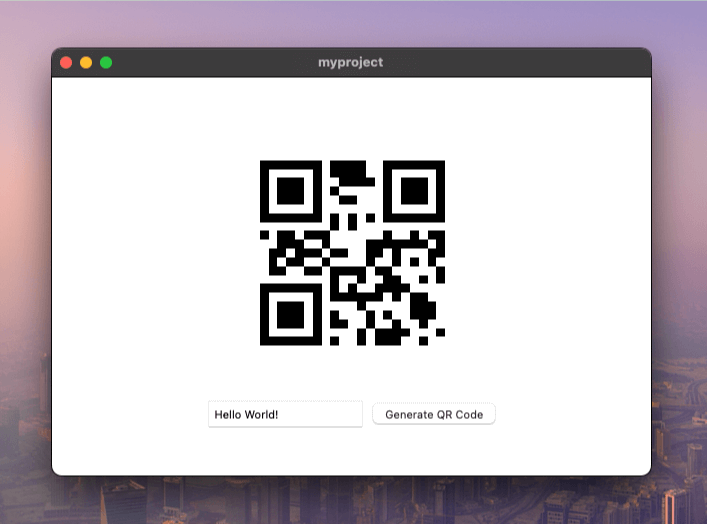
テキストを入力し、「Generate QR Code」ボタンをクリックします。ページの中央に QR コードが表示されます。
別の方法:HTTP ハンドラー
ここまで、次の内容を説明しました。
- 新しいサービスの作成
- バインディングの生成
- フロントエンドコードでのバインディングの使用
HTTP ハンドラーを使用する理由
メソッドバインディングはデータ操作に適していますが、ファイル、画像、その他のメディアを配信するには別の方法もあります。すべてをbase64に変換してバインディング経由で送信する代わりに、サービスを小型のWebサーバーのように動作させることができます。
これは、次のような場合に便利です。
- 画像、動画、または大きなファイルを配信する場合
src属性を指定した標準のHTML<img>タグまたは<video>タグを使用したい場合- URLからリソースに直接アクセスする必要がある場合
サービスにGo標準のServeHTTP(w http.ResponseWriter, r *http.Request)メソッドを実装すると、WailsはそのサービスをHTTPエンドポイントとして公開できます。QRコードサービスを拡張して、この機能に対応させましょう。
package main

import (
    "net/http"
    "strconv"

    "github.com/skip2/go-qrcode"
)

// QRService handles QR code generation
type QRService struct {
    // We can add state here if needed
}

// NewQRService creates a new QR service
func NewQRService() *QRService {
    return &QRService{}
}

// Generate creates a QR code from the given text
func (s *QRService) Generate(text string, size int) ([]byte, error) {
    // Generate the QR code
    qr, err := qrcode.New(text, qrcode.Medium)
    if err != nil {
        return nil, err
    }

    // Convert to PNG
    png, err := qr.PNG(size)
    if err != nil {
        return nil, err
    }

    return png, nil
}

func (s *QRService) ServeHTTP(w http.ResponseWriter, r *http.Request) {
    // Extract the text parameter from the request
    text := r.URL.Query().Get("text")
    if text == "" {
        http.Error(w, "Missing 'text' parameter", http.StatusBadRequest)
        return
    }
    // Extract Size parameter from the request
    sizeText := r.URL.Query().Get("size")
    if sizeText == "" {
        sizeText = "256"
    }
    size, err := strconv.Atoi(sizeText)
    if err != nil {
        http.Error(w, "Invalid 'size' parameter", http.StatusBadRequest)
        return
    }

    // Generate the QR code
    qrCodeData, err := s.Generate(text, size)
    if err != nil {
        http.Error(w, err.Error(), http.StatusInternalServerError)
        return
    }

    // Write the QR code data to the response
    w.Header().Set("Content-Type", "image/png")
    w.Write(qrCodeData)
}
ここで行っていること:
ServeHTTPは、HTTPリクエストを処理するためのGo標準インターフェースです- URLからクエリパラメーター(
?text=hello&size=256)を解析します - 既存の
Generate()メソッドを呼び出してQRコードを生成します - ブラウザーが画像であると認識できるよう、コンテンツタイプを
image/pngに設定します - PNGの生バイト列をレスポンスに直接書き込みます。base64は不要です!
次にmain.goを更新し、QRコードサービスにアクセスするためのルートを指定します。
 func main() {

     app := application.New(application.Options{
         Name:        "myproject",
         Description: "A demo of using raw HTML & CSS",
         LogLevel:    slog.LevelDebug,
         Services: []application.Service{
             application.NewServiceWithOptions(NewQRService(), application.ServiceOptions{
                 Route: "/qrservice",
             }),
         },
         Assets: application.AssetOptions{
             Handler: application.AssetFileServerFS(assets),
         },
         Mac: application.MacOptions{
             ApplicationShouldTerminateAfterLastWindowClosed: true,
         },
     })

     app.Window.NewWithOptions(application.WebviewWindowOptions{
         Title:  "myproject",
         Width:  600,
         Height: 400,
     })

     // Run the application. This blocks until the application has been exited.
     err := app.Run()

     // If an error occurred while running the application, log it and exit.
     if err != nil {
         log.Fatal(err)
     }
 }
ここで行っていること:
- サービスの公開方法を設定するために
application.ServiceOptionsを追加します Route: "/qrservice"により、/qrserviceでHTTPハンドラーにアクセスできるようになります- これで、
/qrservice?text=helloへのすべてのリクエストからServeHTTPメソッドが呼び出されます Routeを設定しない場合、HTTPハンドラー機能は無効になります
最後にmain.jsを更新し、base64エンコードの代わりに単純な画像srcを使用します。
async function generateQR() {
    const text = document.getElementById('text').value;
    if (!text) {
        alert('Please enter some text');
        return;
    }

    const img = document.getElementById('qrcode');
    // Make the image source the path to the QR code service, passing the text
    img.src = `/qrservice?text=${encodeURIComponent(text)}`
}

export function initializeQRGenerator() {
    const button = document.getElementById('generateButton');
    if (button) {
        button.addEventListener('click', generateQR);
    } else {
        console.error('Generate button not found');
    }
}
ここで行っていること:
- importと
await QRService.Generate()の呼び出しを削除しました - 代わりに、
img.srcがHTTPエンドポイントを指すよう設定するだけです encodeURIComponent()は、URL内の特殊文字を安全にエスケープしますsrcを設定すると、ブラウザーはHTTP GETリクエストを自動的に送信します- 画像にはこちらの方が簡単で効率的です。base64への変換は不要です!
アプリケーションをもう一度実行すると、同じQRコードが表示されます。
動的な設定への対応
ルートをハードコードする場合の問題:
上の例では、JavaScriptコード内にルート/qrserviceをハードコードしました。 これにより、Goの設定とフロントエンドコードが密結合になります。
main.goを編集してRouteオプションを変更したにもかかわらず、main.jsを更新しなければ、 アプリケーションは動作しなくなります。
        // ...
            application.NewServiceWithOptions(NewQRService(), application.ServiceOptions{
                Route: "/services/qr",
            }),
        // ...
ルートのハードコードは単純なアプリケーションでは機能しますが、コードが変更に弱くなり、保守も難しくなります。
解決策:動的な設定
メソッドバインディングとHTTPハンドラーは併用できます!バインディングを使って使用すべきルートをフロントエンドに伝えれば、設定を動的にして、ハードコードされたパスをなくすことができます。
仕組みは次のとおりです。
- アプリの起動時に
ServiceStartupライフサイクルメソッドが実行されます - オプションに設定されたルートを保存します
- フロントエンドから呼び出して正しいルートを取得できる
URL()メソッドを追加します - これで、フロントエンドはルートを推測する代わりにGoサービスへ問い合わせます
まず、ServiceStartupインターフェースを実装し、新しいURLメソッドを追加します。
package main

import (
    "context"
    "net/http"
    "net/url"
    "strconv"

    "github.com/skip2/go-qrcode"
    "github.com/wailsapp/wails/v3/pkg/application"
)

// QRService handles QR code generation
type QRService struct {
    route string
}

// NewQRService creates a new QR service
func NewQRService() *QRService {
    return &QRService{}
}

// ServiceStartup runs at application startup.
func (s *QRService) ServiceStartup(ctx context.Context, options application.ServiceOptions) error {
    s.route = options.Route
    return nil
}

// Generate creates a QR code from the given text
func (s *QRService) Generate(text string, size int) ([]byte, error) {
    // Generate the QR code
    qr, err := qrcode.New(text, qrcode.Medium)
    if err != nil {
        return nil, err
    }

    // Convert to PNG
    png, err := qr.PNG(size)
    if err != nil {
        return nil, err
    }

    return png, nil
}

// URL returns an URL that may be used to fetch
// a QR code with the given text and size.
// It returns an error if the HTTP handler is not available.
func (s *QRService) URL(text string, size int) (string, error) {
    if s.route == "" {
        return "", errors.New("http handler unavailable")
    }

    return fmt.Sprintf("%s?text=%s&size=%d", s.route, url.QueryEscape(text), size), nil
}

func (s *QRService) ServeHTTP(w http.ResponseWriter, r *http.Request) {
    // Extract the text parameter from the request
    text := r.URL.Query().Get("text")
    if text == "" {
        http.Error(w, "Missing 'text' parameter", http.StatusBadRequest)
        return
    }
    // Extract Size parameter from the request
    sizeText := r.URL.Query().Get("size")
    if sizeText == "" {
        sizeText = "256"
    }
    size, err := strconv.Atoi(sizeText)
    if err != nil {
        http.Error(w, "Invalid 'size' parameter", http.StatusBadRequest)
        return
    }

    // Generate the QR code
    qrCodeData, err := s.Generate(text, size)
    if err != nil {
        http.Error(w, err.Error(), http.StatusInternalServerError)
        return
    }

    // Write the QR code data to the response
    w.Header().Set("Content-Type", "image/png")
    w.Write(qrCodeData)
}
ここで行っていること:
ServiceStartupから取得した設定済みのルートを保存するため、routeフィールドを追加しました- アプリの起動時に
ServiceStartup(ctx, options)が呼び出されるため、ここでルートを保存します URL()メソッドは、クエリパラメーターを含む完全なURLを組み立てます- ルートが設定されていない場合(ルートが空の場合)は、エラーを返します
url.QueryEscape()は、URLで使用できるようにテキストを安全にエンコードします- このメソッドは、バインディングを通じてフロントエンドから利用できるようになります
次にmain.jsを更新し、ハードコードされたパスの代わりにURLメソッドを使用します。
import { QRService } from "./bindings/changeme";

async function generateQR() {
    const text = document.getElementById('text').value;
    if (!text) {
        alert('Please enter some text');
        return;
    }

    const img = document.getElementById('qrcode');
    // Invoke the URL method to obtain an URL for the given text.
    img.src = await QRService.URL(text, 256);
}

export function initializeQRGenerator() {
    const button = document.getElementById('generateButton');
    if (button) {
        button.addEventListener('click', generateQR);
    } else {
        console.error('Generate button not found');
    }
}
ここで行っていること:
- バインディングを再び使用するために
QRServiceをimportします /qrserviceをハードコードする代わりに、await QRService.URL(text, 256)を呼び出します- Goサービスが正しいルートとパラメーターを使ってURLを組み立てます
- これで、
main.go内のルートを変更すると、フロントエンドは新しいルートを自動的に使用します - Goの設定とフロントエンドコードを手動で同期する必要はもうありません!
前の例とまったく同じように動作しますが、 main.go内のサービスルートを変更しても、 フロントエンドが動作しなくなることはありません。