

ファイルダイアログ
ファイルを開く、保存する、フォルダーを選択するためのダイアログ
ファイルダイアログ
Wails は、ファイルを開く、ファイルを保存する、フォルダーを選択するための、各プラットフォームに適した外観のネイティブファイルダイアログを提供します。ファイル形式のフィルタリング、複数選択、デフォルトの場所をサポートするシンプルな API です。
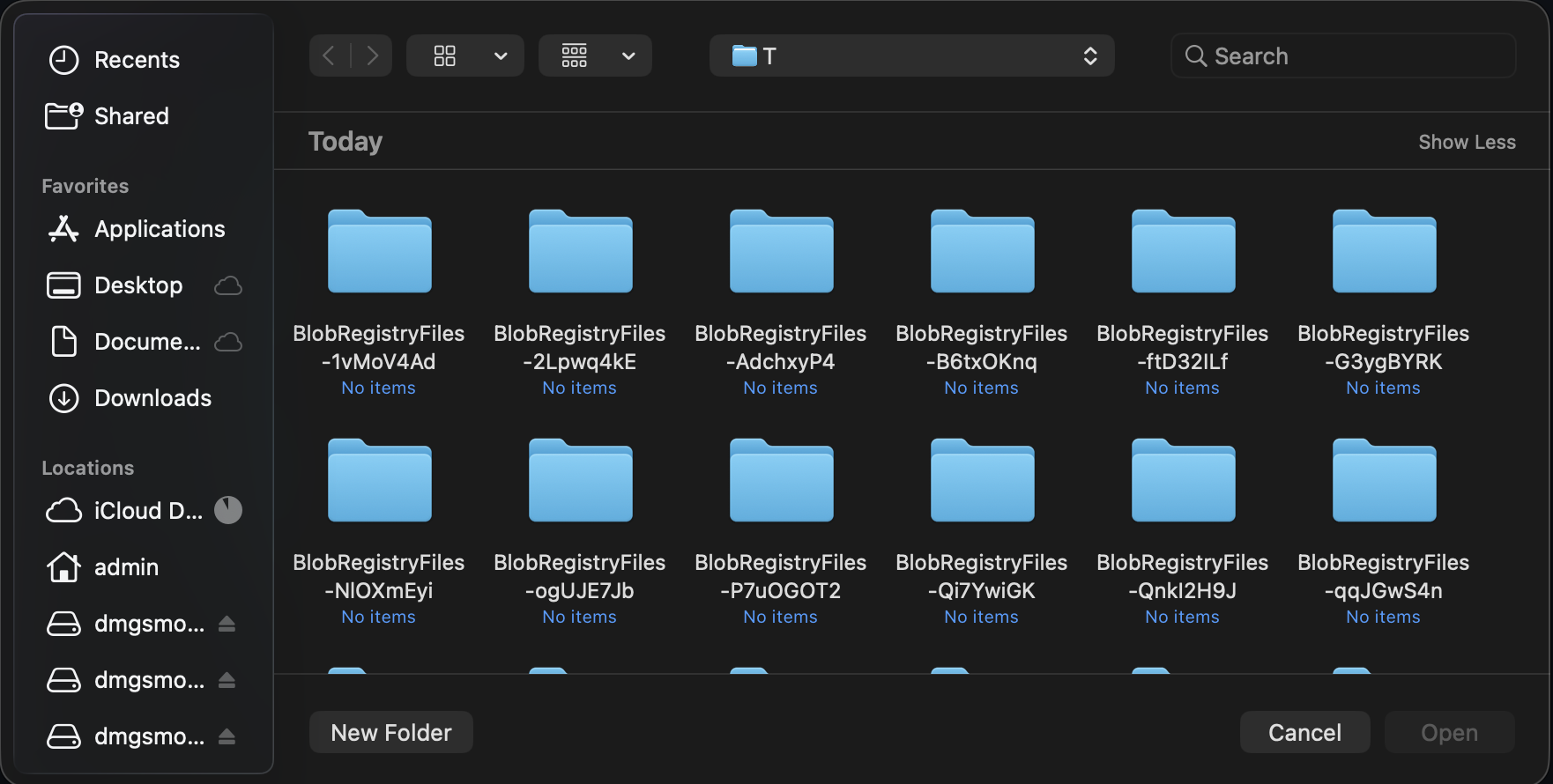
Wails API はオペレーティングシステムの選択ダイアログに処理を委譲するため、使い慣れたナビゲーション、フィルタリング、選択操作が維持されます。
ファイルダイアログの作成
ファイルダイアログには、app.Dialogマネージャーを介してアクセスします。
go
app.Dialog.OpenFile()
app.Dialog.SaveFile()
ファイルを開くダイアログ
開くファイルを選択します。
go
path, err := app.Dialog.OpenFile().
    SetTitle("Select Image").
    AddFilter("Images", "*.png;*.jpg;*.gif").
    AddFilter("All Files", "*.*").
    PromptForSingleSelection()

if err != nil || path == "" {
    return
}

openFile(path)
ユースケース:
- ドキュメントを開く
- ファイルをインポートする
- 画像を読み込む
- 設定ファイルを選択する
単一ファイルの選択
go
path, err := app.Dialog.OpenFile().
    SetTitle("Open Document").
    AddFilter("Text Files", "*.txt").
    AddFilter("All Files", "*.*").
    PromptForSingleSelection()

if err != nil || path == "" {
    // User cancelled or error occurred
    return
}

// Use selected file
data, _ := os.ReadFile(path)
複数ファイルの選択
go
paths, err := app.Dialog.OpenFile().
    SetTitle("Select Images").
    AddFilter("Images", "*.png;*.jpg;*.jpeg;*.gif").
    PromptForMultipleSelection()

if err != nil {
    return
}

// Process all selected files
for _, path := range paths {
    processFile(path)
}
デフォルトディレクトリの指定
go
path, err := app.Dialog.OpenFile().
    SetTitle("Open File").
    SetDirectory("/Users/me/Documents").
    PromptForSingleSelection()
ファイルを保存するダイアログ
保存先を選択します。
go
path, err := app.Dialog.SaveFile().
    SetFilename("document.txt").
    AddFilter("Text Files", "*.txt").
    AddFilter("All Files", "*.*").
    PromptForSingleSelection()

if err != nil || path == "" {
    return
}

saveFile(path, data)
ユースケース:
- ドキュメントを保存する
- データをエクスポートする
- 新しいファイルを作成する
- 名前を付けて保存…
デフォルトファイル名の指定
go
path, err := app.Dialog.SaveFile().
    SetFilename("export.csv").
    AddFilter("CSV Files", "*.csv").
    PromptForSingleSelection()
デフォルトディレクトリの指定
go
path, err := app.Dialog.SaveFile().
    SetDirectory("/Users/me/Documents").
    SetFilename("untitled.txt").
    PromptForSingleSelection()
上書きの確認
go
path, err := app.Dialog.SaveFile().
    SetFilename("document.txt").
    PromptForSingleSelection()

if err != nil || path == "" {
    return
}

// Check if file exists
if _, err := os.Stat(path); err == nil {
    dialog := app.Dialog.Question().
        SetTitle("Confirm Overwrite").
        SetMessage("File already exists. Overwrite?")

    overwriteBtn := dialog.AddButton("Overwrite")
    overwriteBtn.OnClick(func() {
        saveFile(path, data)
    })

    cancelBtn := dialog.AddButton("Cancel")
    dialog.SetDefaultButton(cancelBtn)
    dialog.SetCancelButton(cancelBtn)
    dialog.Show()
    return
}

saveFile(path, data)
フォルダー選択ダイアログ
ディレクトリ選択を有効にしたファイルを開くダイアログを使用して、ディレクトリを選択します。
go
path, err := app.Dialog.OpenFile().
    SetTitle("Select Output Folder").
    CanChooseDirectories(true).
    CanChooseFiles(false).
    PromptForSingleSelection()

if err != nil || path == "" {
    return
}

exportToFolder(path)
ユースケース:
- 出力先ディレクトリを選択する
- ワークスペースを選択する
- バックアップ先を選択する
- インストール先ディレクトリを選択する
デフォルトディレクトリの指定
go
path, err := app.Dialog.OpenFile().
    SetTitle("Select Folder").
    SetDirectory("/Users/me/Documents").
    CanChooseDirectories(true).
    CanChooseFiles(false).
    PromptForSingleSelection()
ファイルフィルター
AddFilter()メソッドを使用して、ダイアログにファイル形式フィルターを追加します。呼び出すたびに新しいフィルターオプションが追加されます。
基本的なフィルター
go
path, _ := app.Dialog.OpenFile().
    AddFilter("Text Files", "*.txt").
    AddFilter("All Files", "*.*").
    PromptForSingleSelection()
複数の拡張子
1 つのフィルターに複数の拡張子を指定するには、セミコロンで区切ります。
go
dialog := app.Dialog.OpenFile().
    AddFilter("Images", "*.png;*.jpg;*.jpeg;*.gif;*.bmp").
    AddFilter("Documents", "*.txt;*.doc;*.docx;*.pdf").
    AddFilter("All Files", "*.*")
パターン形式
1 つのフィルターに複数の拡張子を指定するには、セミコロンで区切ります。
go
// Multiple extensions separated by semicolons
AddFilter("Images", "*.png;*.jpg;*.gif")
完全な例
画像ファイルを開く
go
func openImage(app *application.App) (image.Image, error) {
    path, err := app.Dialog.OpenFile().
        SetTitle("Select Image").
        AddFilter("Images", "*.png;*.jpg;*.jpeg;*.gif;*.bmp").
        PromptForSingleSelection()

    if err != nil {
        return nil, err
    }

    if path == "" {
        return nil, errors.New("no file selected")
    }

    // Open and decode image
    file, err := os.Open(path)
    if err != nil {
        app.Dialog.Error().
            SetTitle("Open Failed").
            SetMessage(err.Error()).
            Show()
        return nil, err
    }
    defer file.Close()

    img, _, err := image.Decode(file)
    if err != nil {
        app.Dialog.Error().
            SetTitle("Invalid Image").
            SetMessage("Could not decode image file.").
            Show()
        return nil, err
    }

    return img, nil
}
検証してドキュメントを保存する
go
func saveDocument(app *application.App, content string) {
    path, err := app.Dialog.SaveFile().
        SetFilename("document.txt").
        AddFilter("Text Files", "*.txt").
        AddFilter("Markdown Files", "*.md").
        AddFilter("All Files", "*.*").
        PromptForSingleSelection()

    if err != nil || path == "" {
        return
    }

    // Validate extension
    ext := filepath.Ext(path)
    if ext != ".txt" && ext != ".md" {
        dialog := app.Dialog.Question().
            SetTitle("Confirm Extension").
            SetMessage(fmt.Sprintf("Save as %s file?", ext))

        saveBtn := dialog.AddButton("Save")
        saveBtn.OnClick(func() {
            doSave(app, path, content)
        })

        cancelBtn := dialog.AddButton("Cancel")
        dialog.SetDefaultButton(cancelBtn)
        dialog.SetCancelButton(cancelBtn)
        dialog.Show()
        return
    }

    doSave(app, path, content)
}

func doSave(app *application.App, path, content string) {
    if err := os.WriteFile(path, []byte(content), 0644); err != nil {
        app.Dialog.Error().
            SetTitle("Save Failed").
            SetMessage(err.Error()).
            Show()
        return
    }

    app.Dialog.Info().
        SetTitle("Saved").
        SetMessage("Document saved successfully!").
        Show()
}
ファイルの一括処理
go
func processMultipleFiles(app *application.App) {
    paths, err := app.Dialog.OpenFile().
        SetTitle("Select Files to Process").
        AddFilter("Images", "*.png;*.jpg").
        PromptForMultipleSelection()

    if err != nil || len(paths) == 0 {
        return
    }

    // Confirm processing
    dialog := app.Dialog.Question().
        SetTitle("Confirm Processing").
        SetMessage(fmt.Sprintf("Process %d file(s)?", len(paths)))

    processBtn := dialog.AddButton("Process")
    processBtn.OnClick(func() {
        // Process files
        var errs []error
        for i, path := range paths {
            if err := processFile(path); err != nil {
                errs = append(errs, err)
            }

            // Update progress
            // app.Event.Emit("progress", map[string]interface{}{
            //     "current": i + 1,
            //     "total":   len(paths),
            // })
            _ = i // suppress unused variable warning in example
        }

        // Show results
        if len(errs) > 0 {
            app.Dialog.Warning().
                SetTitle("Processing Complete").
                SetMessage(fmt.Sprintf("Processed %d files with %d errors.",
                    len(paths), len(errs))).
                Show()
        } else {
            app.Dialog.Info().
                SetTitle("Success").
                SetMessage(fmt.Sprintf("Processed %d files successfully!", len(paths))).
                Show()
        }
    })

    cancelBtn := dialog.AddButton("Cancel")
    dialog.SetCancelButton(cancelBtn)
    dialog.Show()
}
フォルダーを選択してエクスポートする
go
func exportData(app *application.App, data []byte) {
    // Select output folder
    folder, err := app.Dialog.OpenFile().
        SetTitle("Select Export Folder").
        SetDirectory(getDefaultExportFolder()).
        CanChooseDirectories(true).
        CanChooseFiles(false).
        PromptForSingleSelection()

    if err != nil || folder == "" {
        return
    }

    // Generate filename
    filename := fmt.Sprintf("export_%s.csv",
        time.Now().Format("2006-01-02_15-04-05"))
    path := filepath.Join(folder, filename)

    // Save file
    if err := os.WriteFile(path, data, 0644); err != nil {
        app.Dialog.Error().
            SetTitle("Export Failed").
            SetMessage(err.Error()).
            Show()
        return
    }

    // Show success with option to open folder
    dialog := app.Dialog.Question().
        SetTitle("Export Complete").
        SetMessage(fmt.Sprintf("Exported to %s", filename))

    openBtn := dialog.AddButton("Open Folder")
    openBtn.OnClick(func() {
        openFolder(folder)
    })

    dialog.AddButton("OK")
    dialog.Show()
}
検証してインポートする
go
func importConfiguration(app *application.App) {
    path, err := app.Dialog.OpenFile().
        SetTitle("Import Configuration").
        AddFilter("JSON Files", "*.json").
        AddFilter("YAML Files", "*.yaml;*.yml").
        PromptForSingleSelection()

    if err != nil || path == "" {
        return
    }

    // Read file
    data, err := os.ReadFile(path)
    if err != nil {
        app.Dialog.Error().
            SetTitle("Read Failed").
            SetMessage(err.Error()).
            Show()
        return
    }

    // Validate configuration
    config, err := parseConfig(data)
    if err != nil {
        app.Dialog.Error().
            SetTitle("Invalid Configuration").
            SetMessage("File is not a valid configuration.").
            Show()
        return
    }

    // Confirm import
    dialog := app.Dialog.Question().
        SetTitle("Confirm Import").
        SetMessage("Import this configuration?")

    importBtn := dialog.AddButton("Import")
    importBtn.OnClick(func() {
        // Apply configuration
        if err := applyConfig(config); err != nil {
            app.Dialog.Error().
                SetTitle("Import Failed").
                SetMessage(err.Error()).
                Show()
            return
        }

        app.Dialog.Info().
            SetTitle("Success").
            SetMessage("Configuration imported successfully!").
            Show()
    })

    cancelBtn := dialog.AddButton("Cancel")
    dialog.SetCancelButton(cancelBtn)
    dialog.Show()
}
ベストプラクティス
✅ 推奨事項
- ファイルフィルターを用意する — ユーザーがファイルを見つけやすくなります
- 適切なタイトルを設定する — 操作の内容が明確になります
- デフォルトディレクトリを使用する — 適切な場所を開始位置に設定します
- 選択内容を検証する — ファイル形式を確認します
- キャンセルを処理する — ユーザーがキャンセルする可能性があります
- 確認を表示する — 破壊的な操作では確認が必要です
- フィードバックを表示する — 成功またはエラーのメッセージを表示します
❌ 非推奨事項
- 検証を省略しない — ファイル形式を確認します
- エラーを無視しない — キャンセルを処理します
- 汎用的なフィルターを使用しない — 具体的に指定します
- 「すべてのファイル」を忘れない — 必ず選択肢に含めます
- パスをハードコードしない — ユーザーのホームディレクトリを使用します
- ファイルが存在すると思い込まない — 開く前に確認します
プラットフォームによる違い
macOS
- ネイティブの NSOpenPanel/NSSavePanel
- ウィンドウに関連付けた場合はシート形式
- システムテーマに準拠
- Quick Look プレビューをサポート
- タグおよびお気に入りとの統合
Windows
- ネイティブのファイルを開く/保存するダイアログ
- システムテーマに準拠
- 最近使用したファイルとの統合
- ネットワーク上の場所のサポート
Linux
- GTK ファイル選択ダイアログ
- デスクトップ環境によって異なる
- デスクトップテーマに従う
- 最近使用したファイルのサポート
次のステップ
メッセージダイアログ
情報、警告、エラーのダイアログ。
カスタムダイアログ
カスタムダイアログウィンドウを作成します。
バインディング
JavaScript から Go 関数を呼び出します。
イベント
進捗状況の更新にはイベントを使用します。
ご質問がありますか? Discord で質問するか、ファイルダイアログのサンプルを確認してください。