

Notizen
Erstellen Sie eine Notizanwendung mit Dateioperationen und nativen Dialogen
In diesem Tutorial erstellen Sie mit Wails v3 eine Notizanwendung, die Dateioperationen, native Dialoge und moderne Muster für Desktop-Apps veranschaulicht.
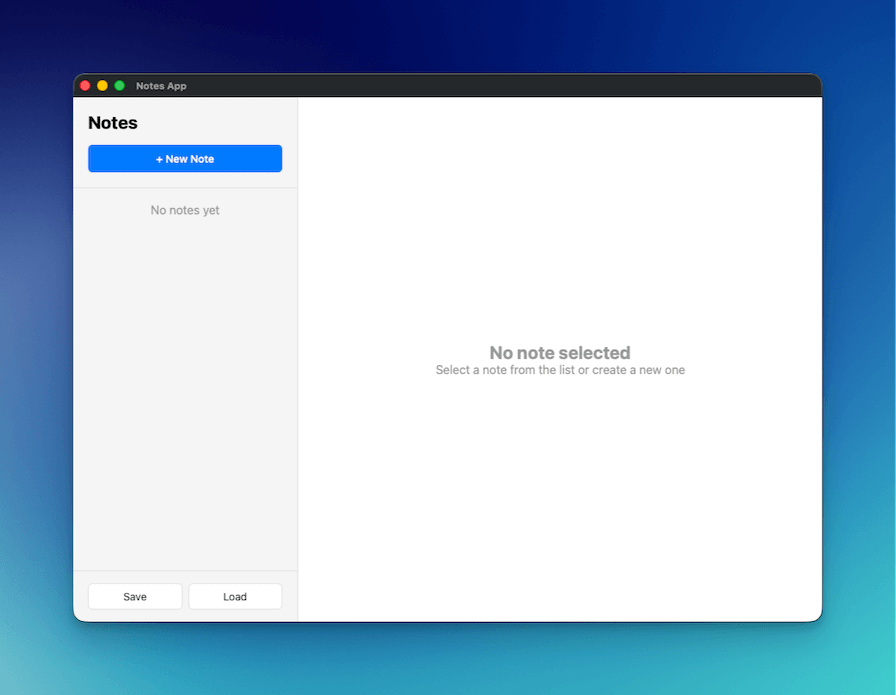
Was Sie erstellen
- Eine vollständige Notizanwendung mit Funktionen zum Erstellen, Bearbeiten und Löschen
- Native Dialoge zum Speichern und Öffnen von Dateien, um Notizen zu importieren und zu exportieren
- Automatisches Speichern während der Eingabe mit Entprellung, um unnötige Aktualisierungen zu reduzieren
- Professionelles, an Apple Notes angelehntes zweispaltiges Layout (Seitenleiste und Editor)
Was Sie lernen
- Native Dateidialoge in Wails verwenden (
SaveFileDialog,OpenFileDialog,InfoDialog) - Mit JSON-Dateien zur dauerhaften Datenspeicherung arbeiten
- Muster für automatisches Speichern mit Entprellung implementieren
- Professionelle Desktop-Benutzeroberflächen mit modernem CSS erstellen
- Go-Strukturen ordnungsgemäß als JSON serialisieren
Projekt einrichten
Neues Wails-Projekt erstellen
wails3 init -n notes-app -t vanilla
cd notes-app
NotesService erstellen
Erstellen Sie im Projektstamm die neue Datei notesservice.go:
package main
import (
"encoding/json"
"errors"
"os"
"time"
"github.com/wailsapp/wails/v3/pkg/application"
)
type Note struct {
ID string `json:"id"`
Title string `json:"title"`
Content string `json:"content"`
CreatedAt time.Time `json:"createdAt"`
UpdatedAt time.Time `json:"updatedAt"`
}
type NotesService struct {
notes []Note
}
func NewNotesService() *NotesService {
return &NotesService{
notes: make([]Note, 0),
}
}
// GetAll returns all notes
func (n *NotesService) GetAll() []Note {
return n.notes
}
// Create creates a new note
func (n *NotesService) Create(title, content string) Note {
note := Note{
ID: generateID(),
Title: title,
Content: content,
CreatedAt: time.Now(),
UpdatedAt: time.Now(),
}
n.notes = append(n.notes, note)
return note
}
// Update updates an existing note
func (n *NotesService) Update(id, title, content string) error {
for i := range n.notes {
if n.notes[i].ID == id {
n.notes[i].Title = title
n.notes[i].Content = content
n.notes[i].UpdatedAt = time.Now()
return nil
}
}
return errors.New("note not found")
}
// Delete deletes a note
func (n *NotesService) Delete(id string) error {
for i := range n.notes {
if n.notes[i].ID == id {
n.notes = append(n.notes[:i], n.notes[i+1:]...)
return nil
}
}
return errors.New("note not found")
}
// SaveToFile saves notes to a file
func (n *NotesService) SaveToFile() error {
path, err := application.Get().Dialog.SaveFile().
SetFilename("notes.json").
AddFilter("JSON Files", "*.json").
PromptForSingleSelection()
if err != nil {
return err
}
data, err := json.MarshalIndent(n.notes, "", " ")
if err != nil {
return err
}
if err := os.WriteFile(path, data, 0644); err != nil {
return err
}
application.Get().Dialog.Info().
SetTitle("Success").
SetMessage("Notes saved successfully!").
Show()
return nil
}
// LoadFromFile loads notes from a file
func (n *NotesService) LoadFromFile() error {
path, err := application.Get().Dialog.OpenFile().
AddFilter("JSON Files", "*.json").
PromptForSingleSelection()
if err != nil {
return err
}
data, err := os.ReadFile(path)
if err != nil {
return err
}
var notes []Note
if err := json.Unmarshal(data, ¬es); err != nil {
return err
}
n.notes = notes
application.Get().Dialog.Info().
SetTitle("Success").
SetMessage("Notes loaded successfully!").
Show()
return nil
}
func generateID() string {
return time.Now().Format("20060102150405")
}Was hier geschieht:
- Note-Struktur: Definiert die Datenstruktur mit kleingeschriebenen JSON-Tags für eine ordnungsgemäße Serialisierung
- CRUD-Operationen: GetAll, Create, Update und Delete zum Verwalten von Notizen im Arbeitsspeicher
- Dateidialoge: Verwendet
application.Get().Dialog.SaveFile()undapplication.Get().Dialog.OpenFile()für den Zugriff auf native Dialoge - Informationsdialoge: Zeigt mit
application.Get().Dialog.Info()Erfolgsmeldungen an - ID-Erzeugung: Einfacher zeitstempelbasierter ID-Generator
main.go aktualisieren
Ersetzen Sie den Inhalt von main.go:
package main

import (
	"embed"
	_ "embed"
	"log"

	"github.com/wailsapp/wails/v3/pkg/application"
)

//go:embed all:frontend/dist
var assets embed.FS

func main() {
	app := application.New(application.Options{
		Name:        "Notes App",
		Description: "A simple notes application",
		Services: []application.Service{
			application.NewService(NewNotesService()),
		},
		Assets: application.AssetOptions{
			Handler: application.AssetFileServerFS(assets),
		},
		Mac: application.MacOptions{
			ApplicationShouldTerminateAfterLastWindowClosed: true,
		},
	})

	app.Window.NewWithOptions(application.WebviewWindowOptions{
		Title:            "Notes App",
		Width:            1000,
		Height:           700,
		BackgroundColour: application.NewRGB(255, 255, 255),
		URL:              "/",
	})

	err := app.Run()
	if err != nil {
		log.Fatal(err)
	}
}
Was hier geschieht:
- Registriert
NotesServicebei der Anwendung - Erstellt ein an Apple Notes angelehntes Fenster mit den Abmessungen 1000x700
- Konfiguriert das korrekte Verhalten unter macOS, sodass die Anwendung beim Schließen des letzten Fensters beendet wird
HTML-Struktur erstellen
Ersetzen Sie frontend/index.html:
<!DOCTYPE html>
<html lang="en">
<head>
    <meta charset="UTF-8">
    <meta name="viewport" content="width=device-width, initial-scale=1.0">
    <title>Notes App</title>
    <link rel="stylesheet" href="./style.css">
</head>
<body>
    <div class="app">
        <!-- Sidebar -->
        <div class="sidebar">
            <div class="sidebar-header">
                <h1>Notes</h1>
                <button id="new-note-btn" class="btn-primary">+ New Note</button>
            </div>
            <div id="notes-list" class="notes-list"></div>
            <div class="sidebar-footer">
                <button id="save-btn" class="btn-secondary">Save</button>
                <button id="load-btn" class="btn-secondary">Load</button>
            </div>
        </div>

        <!-- Editor -->
        <div class="editor">
            <div id="empty-state" class="empty-state">
                <h2>No note selected</h2>
                <p>Select a note from the list or create a new one</p>
            </div>
            <div id="note-editor" class="note-editor" style="display: none;">
                <input type="text" id="note-title" placeholder="Note title" class="title-input">
                <textarea id="note-content" placeholder="Start typing..." class="content-input"></textarea>
                <div class="editor-footer">
                    <button id="delete-btn" class="btn-danger">Delete</button>
                    <span id="last-updated" class="last-updated"></span>
                </div>
            </div>
        </div>
    </div>

    <script src="/wails/runtime.js"></script>
    <script type="module" src="./src/main.js"></script>
</body>
</html>
Was hier geschieht:
- Zweispaltiges Layout: Seitenleiste für die Notizenliste, Hauptbereich für den Editor
- Leerer Zustand: Wird angezeigt, wenn keine Notiz ausgewählt ist
- Wails-Laufzeit: Muss vor dem Modulskript geladen werden
CSS-Stile hinzufügen
Ersetzen Sie frontend/public/style.css:
* {
    margin: 0;
    padding: 0;
    box-sizing: border-box;
}

body {
    font-family: -apple-system, BlinkMacSystemFont, 'Segoe UI', Roboto, sans-serif;
    height: 100vh;
    overflow: hidden;
}

.app {
    display: flex;
    height: 100vh;
}

/* Sidebar */
.sidebar {
    width: 300px;
    background: #f5f5f5;
    border-right: 1px solid #e0e0e0;
    display: flex;
    flex-direction: column;
}

.sidebar-header {
    padding: 20px;
    border-bottom: 1px solid #e0e0e0;
}

.sidebar-header h1 {
    font-size: 24px;
    margin-bottom: 16px;
}

.notes-list {
    flex: 1;
    overflow-y: auto;
}

.note-item {
    padding: 16px 20px;
    border-bottom: 1px solid #e0e0e0;
    cursor: pointer;
    transition: background 0.2s;
}

.note-item:hover {
    background: #e8e8e8;
}

.note-item.active {
    background: #007aff;
    color: white;
}

.note-item h3 {
    font-size: 16px;
    margin-bottom: 4px;
}

.note-item p {
    font-size: 14px;
    opacity: 0.7;
    white-space: nowrap;
    overflow: hidden;
    text-overflow: ellipsis;
}

.sidebar-footer {
    padding: 16px 20px;
    border-top: 1px solid #e0e0e0;
    display: flex;
    gap: 8px;
}

/* Editor */
.editor {
    flex: 1;
    display: flex;
    flex-direction: column;
}

.empty-state {
    flex: 1;
    display: flex;
    flex-direction: column;
    align-items: center;
    justify-content: center;
    color: #999;
}

.note-editor {
    flex: 1;
    display: flex;
    flex-direction: column;
    padding: 20px;
}

.title-input {
    font-size: 32px;
    font-weight: bold;
    border: none;
    outline: none;
    margin-bottom: 16px;
    padding: 8px 0;
}

.content-input {
    flex: 1;
    font-size: 16px;
    border: none;
    outline: none;
    resize: none;
    font-family: inherit;
    line-height: 1.6;
}

.editor-footer {
    display: flex;
    justify-content: space-between;
    align-items: center;
    padding-top: 16px;
    border-top: 1px solid #e0e0e0;
}

.last-updated {
    font-size: 14px;
    color: #999;
}

/* Buttons */
.btn-primary {
    background: #007aff;
    color: white;
    border: none;
    padding: 10px 20px;
    border-radius: 6px;
    cursor: pointer;
    font-size: 14px;
    font-weight: 500;
    width: 100%;
}

.btn-primary:hover {
    background: #0056b3;
}

.btn-secondary {
    background: white;
    color: #333;
    border: 1px solid #e0e0e0;
    padding: 8px 16px;
    border-radius: 6px;
    cursor: pointer;
    font-size: 14px;
    flex: 1;
}

.btn-secondary:hover {
    background: #f5f5f5;
}

.btn-danger {
    background: #ff3b30;
    color: white;
    border: none;
    padding: 8px 16px;
    border-radius: 6px;
    cursor: pointer;
    font-size: 14px;
}

.btn-danger:hover {
    background: #cc0000;
}
Was hier geschieht:
- Design im Apple-Stil mit klarer Typografie und Farbgestaltung
- Flexbox-Layout für eine responsive Seitenleiste und einen responsiven Editor
- Hervorhebung der aktiven Notiz mit blauem Hintergrund
- Fließende Übergänge beim Daraufzeigen
JavaScript-Logik implementieren
Ersetzen Sie frontend/src/main.js:
import { NotesService } from '../bindings/changeme'

let notes = []
let currentNote = null

// Load notes on startup
async function loadNotes() {
    notes = await NotesService.GetAll()
    renderNotesList()
}

// Render notes list
function renderNotesList() {
    const notesList = document.getElementById('notes-list')

    if (notes.length === 0) {
        notesList.innerHTML = '<div style="padding: 20px; text-align: center; color: #999;">No notes yet</div>'
        return
    }

    notesList.innerHTML = notes.map(note => `
        <div class="note-item ${currentNote?.id === note.id ? 'active' : ''}" data-id="${note.id}">
            <h3>${note.title || 'Untitled'}</h3>
            <p>${note.content || 'No content'}</p>
        </div>
    `).join('')

    // Add click handlers
    document.querySelectorAll('.note-item').forEach(item => {
        item.addEventListener('click', () => {
            const id = item.dataset.id
            selectNote(id)
        })
    })
}

// Select a note
function selectNote(id) {
    currentNote = notes.find(n => n.id === id)
    if (currentNote) {
        document.getElementById('empty-state').style.display = 'none'
        document.getElementById('note-editor').style.display = 'flex'
        document.getElementById('note-title').value = currentNote.title
        document.getElementById('note-content').value = currentNote.content
        document.getElementById('last-updated').textContent =
            `Last updated: ${new Date(currentNote.updatedAt).toLocaleString()}`
        renderNotesList()
    }
}

// Create new note
document.getElementById('new-note-btn').addEventListener('click', async () => {
    const note = await NotesService.Create('Untitled', '')
    notes.push(note)
    selectNote(note.id)
    // Focus the title input and select all text so user can immediately type
    const titleInput = document.getElementById('note-title')
    titleInput.focus()
    titleInput.select()
})

// Update note on input
let updateTimeout
function scheduleUpdate() {
    clearTimeout(updateTimeout)
    updateTimeout = setTimeout(async () => {
        if (currentNote) {
            const title = document.getElementById('note-title').value
            const content = document.getElementById('note-content').value

            await NotesService.Update(currentNote.id, title, content)

            // Update local copy
            const note = notes.find(n => n.id === currentNote.id)
            if (note) {
                note.title = title
                note.content = content
                note.updatedAt = new Date().toISOString()
            }

            renderNotesList()
            document.getElementById('last-updated').textContent =
                `Last updated: ${new Date().toLocaleString()}`
        }
    }, 500)
}

document.getElementById('note-title').addEventListener('input', scheduleUpdate)
document.getElementById('note-content').addEventListener('input', scheduleUpdate)

// Delete note
document.getElementById('delete-btn').addEventListener('click', async () => {
    if (!currentNote) return

    try {
        await NotesService.Delete(currentNote.id)
        notes = notes.filter(n => n.id !== currentNote.id)
        currentNote = null
        document.getElementById('empty-state').style.display = 'flex'
        document.getElementById('note-editor').style.display = 'none'
        renderNotesList()
    } catch (error) {
        console.error('Delete failed:', error)
    }
})

// Save to file
document.getElementById('save-btn').addEventListener('click', async () => {
    try {
        await NotesService.SaveToFile()
    } catch (error) {
        if (error) console.error('Save failed:', error)
    }
})

// Load from file
document.getElementById('load-btn').addEventListener('click', async () => {
    try {
        await NotesService.LoadFromFile()
        notes = await NotesService.GetAll()
        currentNote = null
        document.getElementById('empty-state').style.display = 'flex'
        document.getElementById('note-editor').style.display = 'none'
        renderNotesList()
    } catch (error) {
        if (error) console.error('Load failed:', error)
    }
})

// Initialize
loadNotes()
Was hier geschieht:
- Automatisches Speichern: Eine Entprellzeit von 500 ms verhindert übermäßige Backend-Aufrufe während der Eingabe
- Eigenschaftszugriff: Verwendet kleingeschriebene Eigenschaftsnamen (
.id,.title), die den JSON-Tags in Go entsprechen - Fokusverwaltung: Fokussiert und markiert beim Erstellen neuer Notizen automatisch den Titel
- Löschen ohne Bestätigung:
confirm()des Browsers funktioniert in Wails-Webviews nicht - Dateioperationen: Native Dialoge übernehmen das Speichern und Laden mit ordnungsgemäßer Fehlerbehandlung
Anwendung ausführen
wails3 dev
Die Anwendung wird gestartet. Anschließend können Sie:
- Auf „+ New Note“ klicken, um Notizen zu erstellen
- Titel und Inhalt bearbeiten (werden nach 500 ms automatisch gespeichert)
- In der Seitenleiste auf Notizen klicken, um zwischen ihnen zu wechseln
- Auf „Delete“ klicken, um die aktuelle Notiz zu löschen
- Auf „Save“ klicken, um Notizen als JSON zu exportieren
- Auf „Load“ klicken, um zuvor gespeicherte Notizen zu importieren
Grundlegende Konzepte
Datei- und Meldungsdialoge
In Wails v3 gibt es keine Dialogkonstruktoren auf Paketebene – jeder Dialog wird über den app.Dialog-Manager erstellt. Rufen Sie innerhalb eines Dienstes die Anwendung über application.Get() ab (die Funktion gibt die laufende *application.App zurück):
// Correct — manager-based dialogs.
app := application.Get()
path, err := app.Dialog.SaveFile().
    SetFilename("notes.json").
    AddFilter("JSON Files", "*.json").
    PromptForSingleSelection()
Die entsprechenden Methoden sind app.Dialog.Info() / Question() / Warning() / Error() für Meldungsdialoge und app.Dialog.OpenFile() / SaveFile() (sowie die *WithOptions-Varianten) für Dateidialoge.
Zuordnung von JSON-Tags
JSON-Tags von Go-Strukturen müssen kleingeschrieben sein, damit sie mit dem JavaScript-Eigenschaftszugriff übereinstimmen:
type Note struct {
    ID string `json:"id"` // Must be lowercase
}// JavaScript accesses with lowercase
const noteId = note.id // Correct
const noteId = note.ID // Would be undefinedAutomatisches Speichern mit Entprellung
Die Entprellzeit von 500 ms reduziert unnötige Backend-Aufrufe:
let updateTimeout
function scheduleUpdate() {
    clearTimeout(updateTimeout) // Cancel previous timer
    updateTimeout = setTimeout(async () => {
        // Only saves if user stops typing for 500ms
        await NotesService.Update(currentNote.id, title, content)
    }, 500)
}
Nächste Schritte
- Kategorien oder Tags zum Organisieren von Notizen hinzufügen
- Suche und Filterung implementieren
- Rich-Text-Bearbeitung mit einem WYSIWYG-Editor hinzufügen
- Notizen mit einem Cloud-Speicher synchronisieren
- Tastenkombinationen für häufige Aktionen hinzufügen